Categories
Uncategorized

How to Deposit Crossref DOI?

If you are reading this blog, you might be intending to know how DOI can be generated for research articles or any digital object. If this is not the case, you might be landed on this page to learn about the DOI or to know what is doi. For the second case, I suggest you visit my detailed blog, which emphasizes “What is DOI?“. By reading this blog, your entire idea regarding DOI will be 100% cleared.

In the subsequent section to just get a basic idea about what is DOI to be clear, I am giving an introduction on what is DOI within 4-5 sentences. Please read it first so that you can understand the concept of “what is DOI” and then go for the actual steps.

In brief: What is DOI?

what is doi
what is doi?

A Digital Object Identifier is a unique alphanumeric string assigned to a digital object, such as a journal article, book, or dataset. This string provides a persistent link to the digital object, ensuring it can be found and accessed even if the web address or URL changes. This string consists of a prefix and a suffix, separated by a forward slash, that identifies the object and provides a link to it. For example, the Digital Object Identifier for the article might look like https://doi.org/10.2354/s00369-030-05722-z. Now I think you have enough idea about what is DOI. I am sure that now you can take part in any discussion regarding what is done.

If you already know what is DOI?, let’s directly move on to the DOI deposition steps. The reason for discussing what is doi? in detail was necessary to clear your idea. I would only discuss the steps of generating DOI with Crossref throughout this blog. I have taken one journal article as a digital object for which I will generate the DOI. Before proceeding with the actual process steps, let’s discuss a few prerequisites in the next section. 

what is doi
Crossref Sponsored Partner

Prerequisites

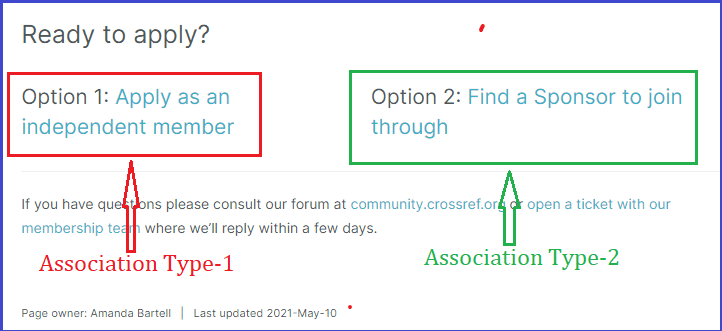
For depositing the DOI, you need to have either of below stated two types of associations with the Crossref. We can also name these associations as a type of user account opened with the Crossref. You are also required to know what is doi?
How to Deposit Crossref DOI? 1
Crossref Memberships

Association Type – 1: Independent membership

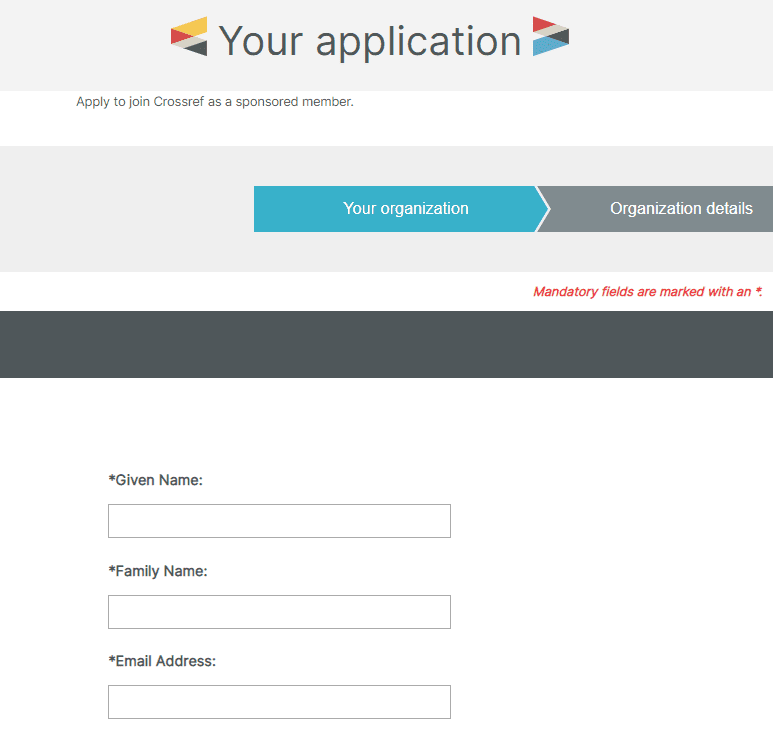
To apply as an independent member, kindly click on the link https://www.crossref.org/_apply/member/ . Then, follow the instructions and insert the relevant information in the prescribed format. 
How to Deposit Crossref DOI? 2
Independent membership application

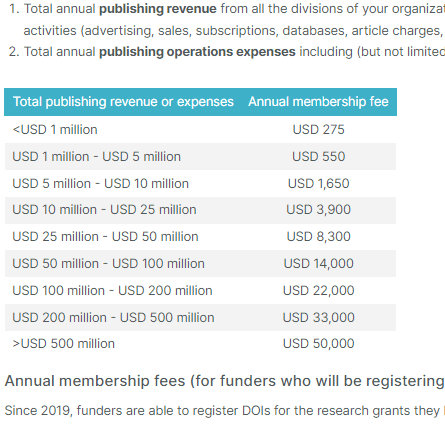
This association will cost you on the higher side. You must pay USD 275/Year to Crossref for this membership. For more detail on the pricing, I am penning down the link here; please click on it:https://www.crossref.org/fees/#annual-membership-fees/ 
How to Deposit Crossref DOI? 3
Crossref Membership Fees

The time taken to open this account will require too much time. It also requires submitting a lot of documents as well. All in all, this is a complex and time-consuming task. Therefore, I suggest you go for this association with Crossref only if you have higher DOI requirements. Otherwise, go for the second option stated below. 

Association Type – 2: Membership via a Sponsor

In case of a few or occasional DOI requirements, I suggest you go for the membership via sponsors. But you may ask a question: how can I find such Crossref Sponsors? To solve this problem, I am giving you the link to find the Crossref Sponsors from your local region: https://www.crossref.org/membership/about-sponsors/.

If you are searching for an official sponsored Crossref partner in India, Sequence R&D is a well-known solution provider. For more details regarding DOI pricing, please click below.

Get DOI >>

Crossref Sponsored Member India

These official Crossref-sponsored partners are eligible to enroll members beneath their sponsorship. However, they can charge you for applying via them to Crossref. The charges may vary depending on the region or members to members.

How to Deposit Crossref DOI? 4
Crossref Membership under the Sponsored Partner

Approaching steps for applying under a sponsored member

  • Contact sponsored members via email and brief them on your requirements.
  • Give them exact numbers of DOI requirements along with the type of digital objects.
  • Sponsored members revert with pricing and annual subscription charges.
  • Upon positive confirmation from your end as well as sponsored members’ end, the sponsored member will ask for further detailed relevant information about your journal or another digital object. 
  • The sponsored member will apply for your membership and will receive your Crossref user account credentials. After which, you will be provided with a username and password for your Crossref account. Keep this username and password safe and secure because you will need this while generating the DOI for your digital objects.

Step-by-Step Guide: For Depositing DOI in Crossref

To deposit/generate the DOI for a particular article or entire volume, please follow the below-mentioned steps. For reference purposes, we have created the DOI for the following digital object.

Journal Volume: Jorangrau April-June 2022

Weblink of Digital Object: http://jorangrau.org/archives/jorangrau-april-june-2022/

Step-1: Collect Journal & Article Information as shown in the sample screenshot.

Step-1.1: Journal Information

  • Title: THE JOURNAL OF RESEARCH ANGRAU
  • Abbr: JORANGRAU
  • Journal DOI: You Can Skip
  • Journal URL: You Can Skip
  • Print ISSN: 0970-0226
  • Elect ISSN: You Can Skip
  • Volume: 50
  • Issue: 02
  • Issue DOI: You Can Skip
  • Issue URL: You Can Skip
  • Type Print (Date): Year: 2022 | Month: 09 | Day: 01
  • Type Online (Date): You Can Skip

Mandatory Data Required for the Journal

  1. Journal Title
  2. Journal Abbreviation
  3. One ISSN (Print or Electronic)
  4. A Publication Year (Print or Electronic)

Step-1.2: Article Information

  • Article Title: BIOEFFICACY OF Metarhizium (Nomuraea) rileyi ON PROTEIN PROFILE DURING EMBRYOGENESIS OF Helicoverpa armigera (HUBNER)
  • Author 1 First Name: A. M.
  • Author 1 Last Name: MOMIN
  • Author 1 Organization: P.G. Department of Zoology, Yashavantrao Chavan Institute of Science, Shivaji University, Kolhapur- 416 012
  • Author 2 First Name: S. P.
  • Author 2 Last Name: NALAWADE
  • Author 2 Organization: P.G. Department of Zoology, Yashavantrao Chavan Institute of Science, Shivaji University, Kolhapur- 416 012
  • Abstract: Entamopathogenic fungi, Metarhizium rileyi is one of the promising alternative over chemical insecticides for the management of a most serious polyphagus pest, H. armigera. Metarhizium rileyi was tested for their median lethal concentrations (LC50) and qualitative proteins against Helicoverpa armigera was carried out at Research laboratory, P.G. Department of Zoology, YashvantaraoChavan Institute of Science,Sataraunder Shivaji University, Kolhapur in 2019.
  • DOI*: 10.58537/angrau2 (This will become the DOI for this article. Note: after your dedicated prefix you can write your choice of word. For example you can write 10.58537/angrau33_research-article).
  • URL*: http://jorangrau.org/archives/jorangrau-april-june-2022/ Note: This is the web link (URL) of the article/volume page for which you are depositing/generating DOI.
  • First Page: 1 (First Page of the Article in volume)
  • Last Page: 9 (Last Page of the Article in volume)

Mandatory Data Required for the Article

  1. A deposit must include at least one article.
  2. Article Title
  3. Article DOI
  4. Article URL

Step-2: Fill out the Web Deposit Form

Click on the URL https://apps.crossref.org/webDeposit/  (of Crossref web deposit form). Now you will see the DOI web deposit form as shown in the screenshot.

Step-2.1: Use the collected information in Step-1.1 to fill this form and click on the button “Add Articles”.
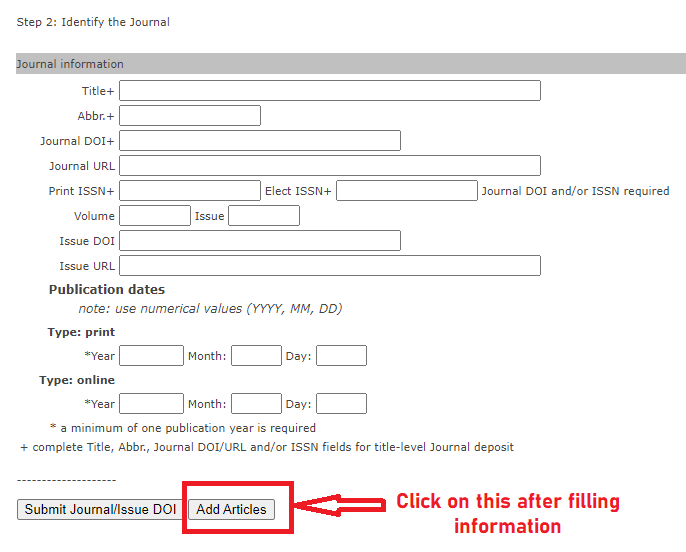
How to Deposit Crossref DOI? 5

Step-2.2: Now article information form will be opened. Use the collected information in Step-1.2 to fill out this form. Then click on the button “Finish”. See the below given screenshot for better clarity.
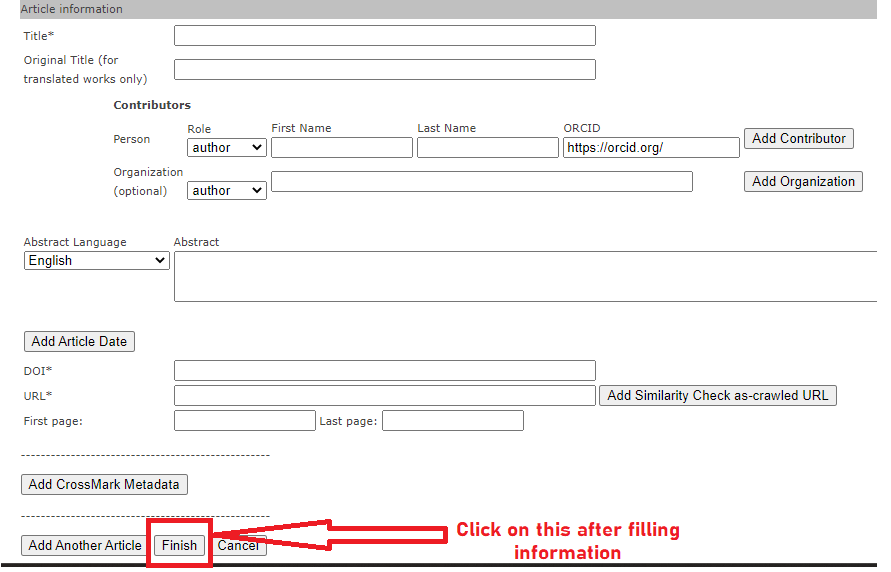
How to Deposit Crossref DOI? 6

Step-3: Use your login credentials

Now you will be redirected to the Crossref user login page. Insert concerned credentials, received from your sponsored agency and log in.
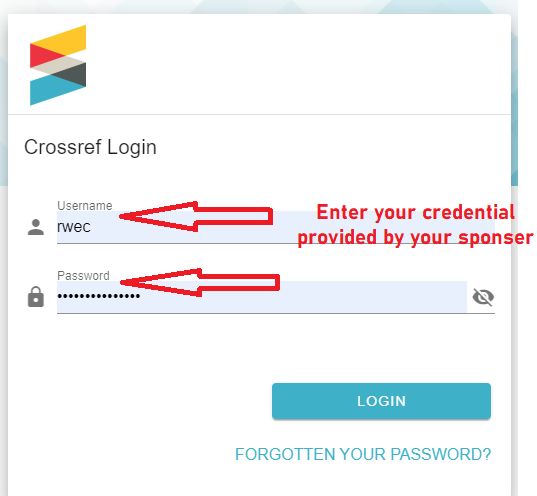
How to Deposit Crossref DOI? 7

Step-4: Provide Your Email ID

Insert desired email id and click on deposit. Make sure to use an email id ending with “@gmail.com” or “@yahoo.com”. Because the system will not accept other email id formats like “.ac.in”. Click on the button “Deposit“.
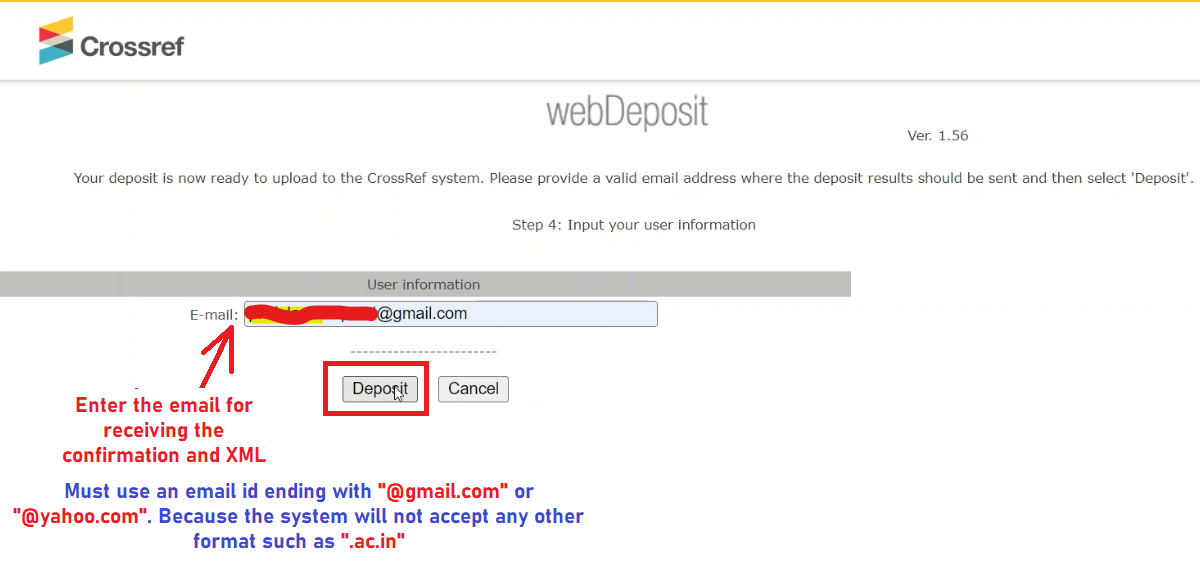
How to Deposit Crossref DOI? 8

Step-5: Final Check for DOI

Your DOI has been generated which you provided during the article information insertion in Step-2.2. To check whether the generated DOI is working or not follow the below steps:

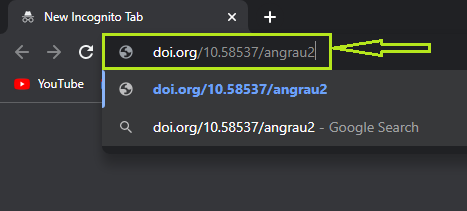
  • Copy DOI links 10.58537/angrau2 and Paste it into the new tab.
  • Write “doi.org/” before 10.58537/angrau2.
  • Which will make your entire link look like this: doi.org/10.58537/angrau2 and press enter.
  • Now you will see your article or whole volume.
How to Deposit Crossref DOI? 9

Step-6: Check Your Provided Email

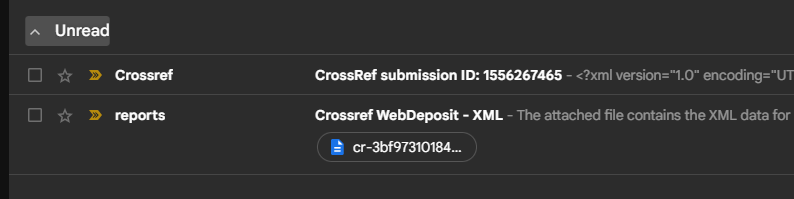
Check your provided email inbox in Step-4 for the confirmation and XML file. You will get 2 separate emails.
How to Deposit Crossref DOI? 10

Complete Video Guide for Depositing DOI in Crossref.

How to deposit Crossref DOI? How to generate Crossref DOI? https://www.ojscloud.com/

Conclusion

In today’s digital age, where the amount of research and data being produced is constantly increasing, a DOI has become an essential tool for researchers, publishers, and institutions to manage their scholarly content effectively. So, everyone needs to know what is doi. By assigning a DOI, authors can ensure their work is accessible, discoverable, and easily cited, thus enhancing its impact and facilitating its dissemination. Overall, understanding what is DOI and how to deposit it in Crossref can make a significant difference in the success and visibility of scholarly work.

Categories
Uncategorized

How to Upgrade Open Journal System from OJS 3.x to OJS 3.3.0-13

Welcome to the step-by-step guide for Upgrade Open Journal System (OJS) version 3. x to OJS-3.3.0-13. This process requires a lot of care, time, and patience as it involves much complexity. An expert must do this upgrade, as you might need some help. There are many chances of losing valuable information, so I urge you to hire an expert agency with good experience in this field.  

Prerequisite: Have you gone through the head-to-tail of my other blog on the “What is Open Journal System (OJS) upgrade? Why upgrade is necessary for the Open Journal System (OJS)?” Because this blog contains all the basic understandings needed for the upgrade. So please go through it and come back here. 

Steps for Open Journal System upgrade from OJS 3.x to OJS 3.3.0-13

Step-1

Take Full Backup: Copy all the directories (Open Journal System Files Folder, Public Folder, Current database) of the existing Open Journal System and store them well for full backups. The backup will be crucial if anything goes wrong in the upgrade process. Because Open Journal System upgrade is a process having a higher rate of failure.

Step-2

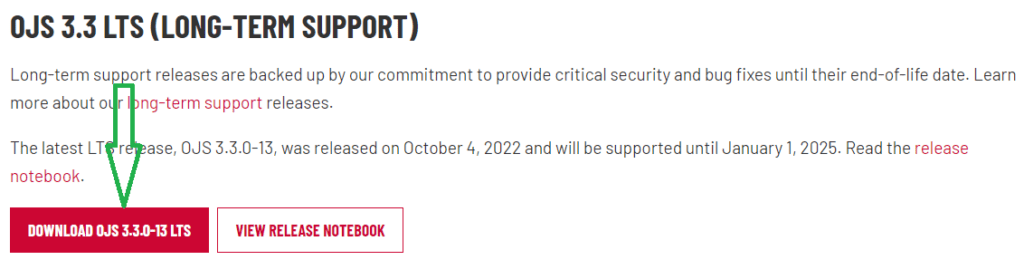
Download the Latest version Folder. You can visit the website:https://pkp.sfu.ca/software/ojs/download/, (and directly jump onto the step-3, you can skip step-2.1 to step-2.6) or you can do this from your website’s back panel. Please follow the below screenshot for the process.

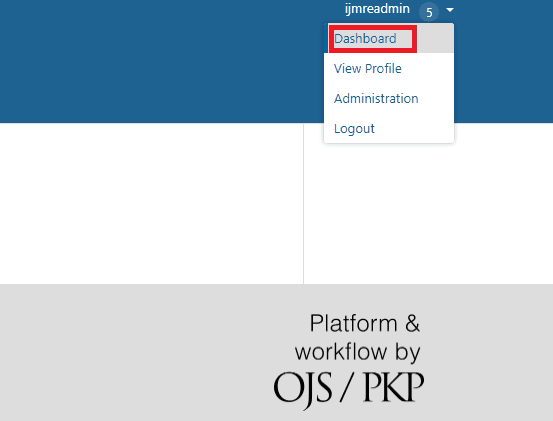
Step-2.1: Log in to your back panel and go to the “Dashboard“.

open journal system

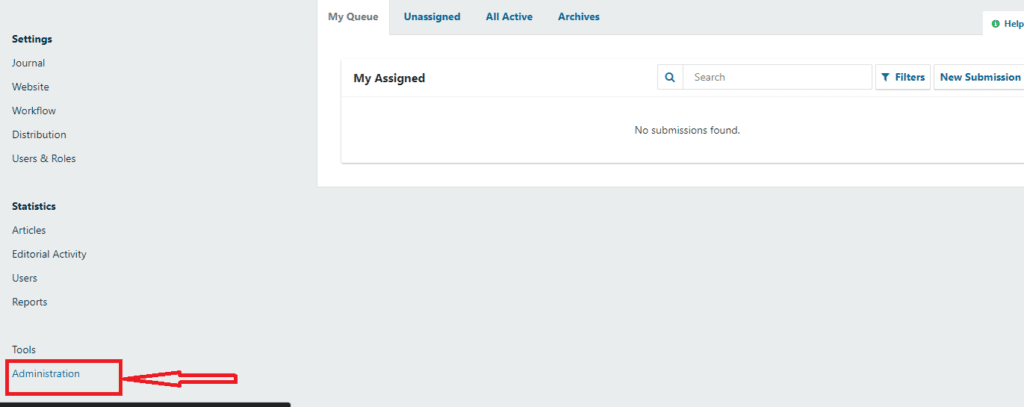
Step-2.2: Click on “Administration” in the left corner.

How to Upgrade Open Journal System from OJS 3.x to OJS 3.3.0-13 11
OJS Upgrade

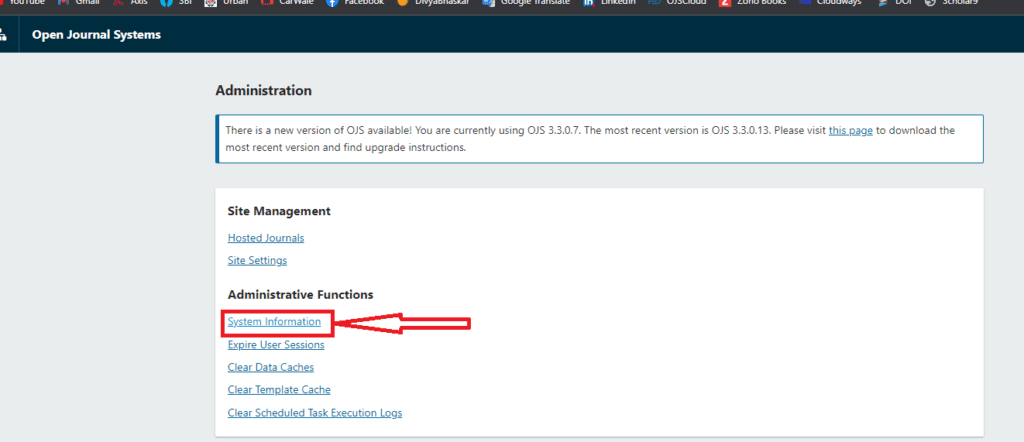
Step-2.3: Click on “System Information”.

How to Upgrade Open Journal System from OJS 3.x to OJS 3.3.0-13 12
OJS Upgrade

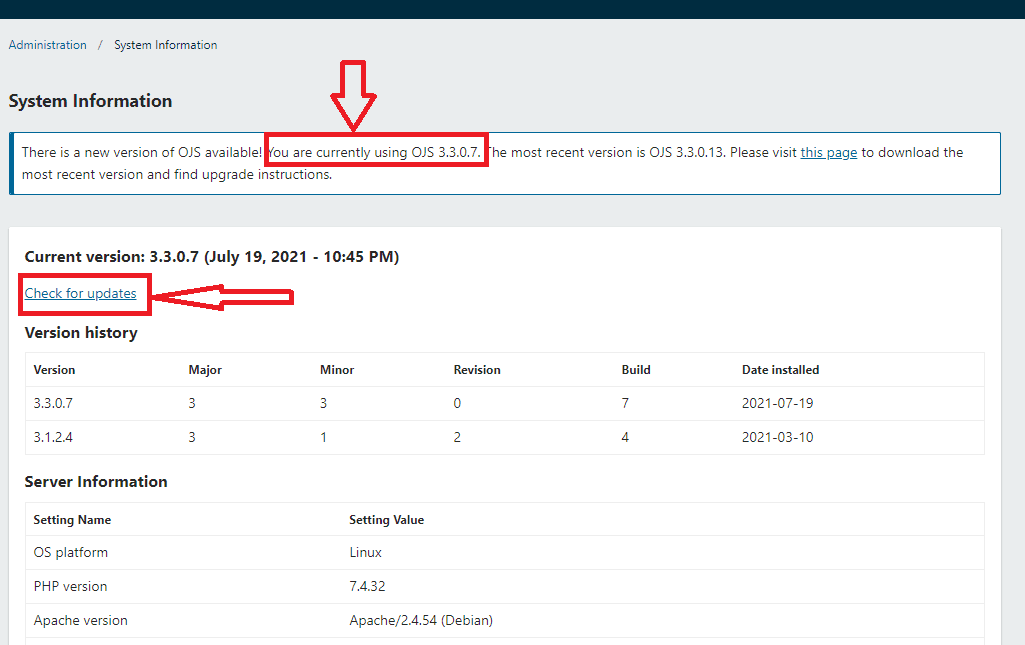
Step-2.4: Now you can check your current version and click “check for the updates“.

How to Upgrade Open Journal System from OJS 3.x to OJS 3.3.0-13 13
OJS Upgrade

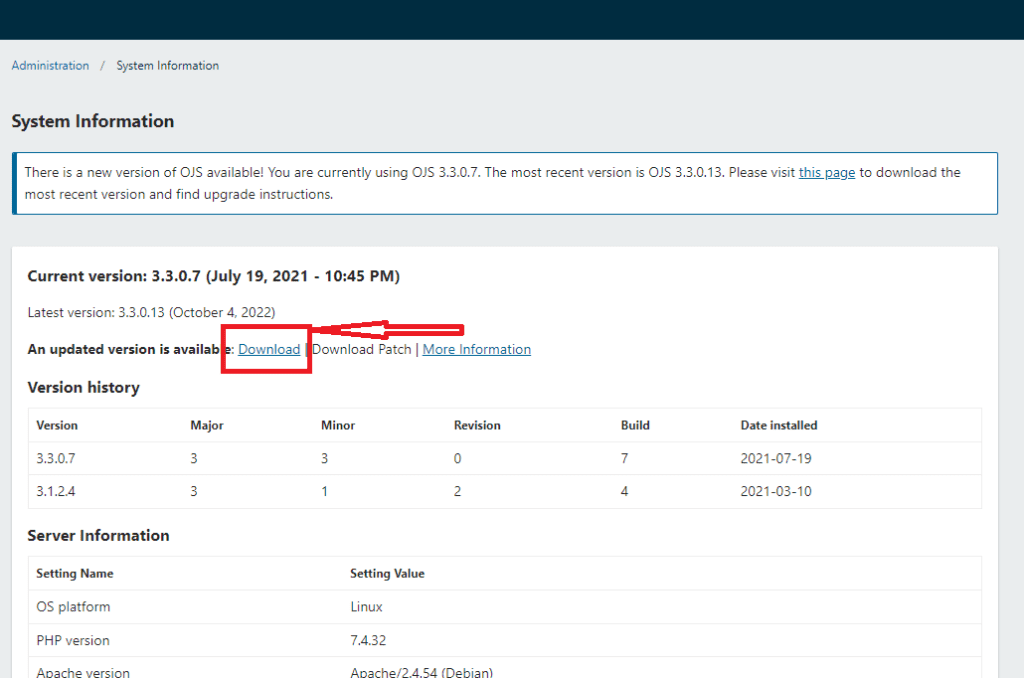
Step-2.5: Click on “download” to get the latest Open Journal System version zip folder.

How to Upgrade Open Journal System from OJS 3.x to OJS 3.3.0-13 14
OJS Upgrade

Step-2.6: This step will take you to the website of PKP, where you can download the latest Open Journal System version by clicking on the below-stated button.

How to Upgrade Open Journal System from OJS 3.x to OJS 3.3.0-13 15
OJS Upgrade

Step-3

Extract the downloaded Folder. In our case, that Folder will be default named “ojs-3.3.0-13“. You can change the name of the Folder, but keep it as it is because it will be easy to identify it as the latest version’s Folder.

Step-4

Upload the extracted Folder (ojs-3.3.0-13 in step-3) to the concerned server where your Open Journal System website is being hosted.

Step-5

Bring from OLD and Put it new Folder: Bring the following two things from the old backup (created in step-1): (1) config.inc.php (2) public/ and upload the above two things to the new version folder (named ojs-3.3.0-13 in step-3).

Step-6

Alter, one file settings in a new Folder:

For this, do as directed below:

  • Find “config.inc.php” file.
  • In this file, find “General Settings”. 
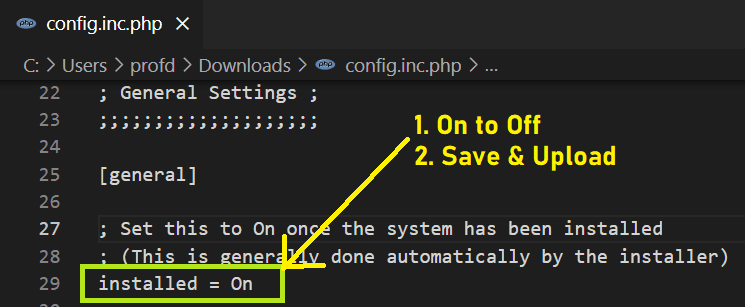
  • Find installed = On and replace with installed = Off.
  • Save this file.
  • See the below screenshot for better clarity.
How to Upgrade Open Journal System from OJS 3.x to OJS 3.3.0-13 16
OJS Upgrade: config.inc.php file change

Step-7

Go to your journal’s website, where you will find below mentioned text along with one hyperlink. “If you are upgrading an existing installation of OJS, click here to proceed.” Please click on the words “click here”.

Now wait for the message given below: “Upgrade of the Open Journal System to version 3.3.0-13 has been completed successfully” (it might take 20-30 minutes to pop. Depending upon the size of your database)

Step-8

Alter one file set in a new Folder:

For this, do as directed below:

  • Find “config.inc.php” file.
  • In this file, find “General Settings”.
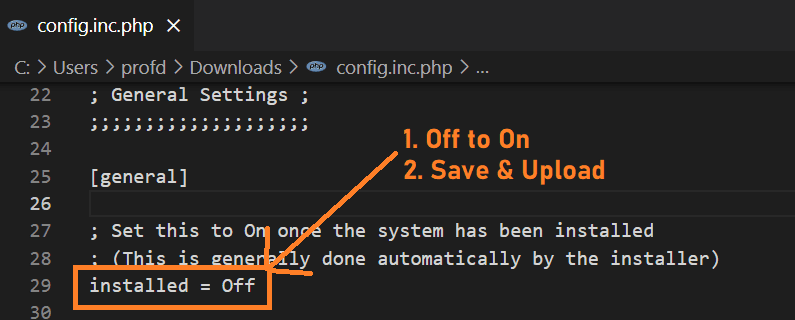
  • Find installed = Off and replace with installed = On,
  • Save this file.
  • See the below screenshot for better clarity.
How to Upgrade Open Journal System from OJS 3.x to OJS 3.3.0-13 17

Step-9

Task Completed:

Congratulations…..!!!! Your Open Journal System has been upgraded to version OJS 3.3.0-13. You can check by refollowing step 2.4

Note: Above mentioned steps do not promise a successful upgrade. You might face trouble upgrading if you have installed a customized theme and plugin. These steps are derived from the actual documentation of the Open Journal System. You are requested to higher expert for this task. In case of any destruction to your database, I am not liable for that.

Precaution Steps for Open Journal System upgrade:

(a) Find the perfect time to upgrade

In a software world, the upgrade is an ongoing process. As a result, PKP continuously releases new minor versions of OJS. It is not advisable that each time you need to keep on updating the OJS each day because it is a time-consuming and complex task. So to solve this confusion, one should keep track of new features available in new releases. Analyze your requirements against the newly released features; if those are necessary, please go for them. However, security point of view, you should upgrade at least once a year. 

(b) Check plugins & important features Compatibility

At the time of the upgrade, ensure that any plugin important to your user is compatible with the OJS 3. If not, you need to wait until the new bug-free version of OJS has been released. Because some of the immediate new version releases may not support all plugins, this care is not only limited to the plugins but must also be kept in mind for other essential features. So it is better to chat with editorial teams before going for an upgrade.

(c) Which version to go for? (i.e. OJS 3.1.0, OJS 3.2.0, or OJS 3.1.0-1; OJS 3.2.0-1)

Generally, it is good to go for the latest version. On the contrary, you must know the type of the latest version. Is it a major or minor update release? Because if you go for the immediate major release, it might contain some bugs, which will be addressed during the subsequent minor release. So my advice is to always go for the latest minor release.

(d) Making Aware the editorial team and other concerns

As this upgrade procedure will affect many areas, relevant entities must be aware of this for a seamless user experience. Before the upgrade announces, all involved parties, like an editorial team, editors, and section editors, must be aware of the upgrade procedure. Though the reviewer and author will not face significant issues with the upgrade.

(e) Make necessary changes to the server to meet the requirements of OJS 3.

You need to focus on the below-mentioned requirements. These have been generated by PKP from users’ feedback, so you may need some extras apart from the below-mentioned.

  • PHP >= 7.2
  • MySQL >= 4.1 
  • PostgreSQL >= 9.1.5
  • Apache >= 1.3.2x or >= 2.0.4x 
  • Microsoft IIS 6
  • Operating system: Any OS that supports the above software, including Linux, BSD, Solaris, Mac OS X, Windows

(f) Prepare a list of items automatically moving to the new version or requiring manual efforts. 

  • Submissions
  • Users
  • Roles/Permission setting
  • Announcements
  • Sections
  • The following items will need manual efforts for moving to OJS 3:
  • Journal Information – Masthead, Editorial Team, Permissions, etc.
  • Customizations – CSS, images, color codes
  • Journal setup settings and textual information
  • Plugins
  • Pages/ Menus
  • Links
  • Files
  • Customized email templates
  • Reviewer Forms
  • Custom blocks
  • PDF uploads

(g) Deletion of the existing database.

This step will wipe out all spam users. So take this as an opportunity to clean up unwanted users from the database. You can manually identify the spam users present in your system by SQL query. This query utilizes email domains fetched during the new user registration.

(h) Perform sandbox testing.

A sandbox is an isolated testing environment that enables users to run programs or open files without affecting the application, system, or platform on which they run. The upgrade task is very intensive, so it is better to be double-sure before going to the war zone.

(i) Evaluate, test, and troubleshoot your sandbox OJS 3 site

This is the right time to test the website involving all stakeholders (Journal Managers, Editors, and Section Editors) in a secure environment. Collect the feedback from the users and, if necessary, go back to the drawing board for changes. This is where you can test the workflow and train the stakeholders.

(j) Adjust your theme (If the custom theme is applied)

After the upgrade, it is most important to check the applied theme. Because the older version theme might not work correctly in the new OJS 3, I suggest checking for the OJS 3 themes to overcome this option.

Please click below to book an appointment for an OJS upgrade.

Upgrade your OJS >>
Open Journal System Upgrade
Categories
Uncategorized

What is a Free Open Journal System (OJS) Upgrade?

Open Journal System (OJS) is an open-source software, developed by Public Knowledge Project (PKP). This journal management system gaining enormous popularity in the last 7-8 years. Many research scholars and renowned institutes throughout the world use this open-source software for accessing open-access journals. It would not be cliche to cite here that the Open Journal System is the home of more than 10000 open-access journals. 

So, by looking at its serving volume and popularity it is in the list of giant software systems like Dspace. Looking at this giant software architecture it definitely requires the addition of new features in form of upgrades.

This article will answer all your queries regarding the Open Journal System (OJS) upgrade, and throw light on the importance of upgrading the Open Journal System (OJS) version along with the upgrade procedure of Open Journal System (OJS). So, tighten your seat belt and have an exciting journey in the world of Open Journal System (OJS) upgrades.

So, What is Open Journal System (OJS) upgrade?

OJS Upgrade is a process of migrating from the older version to the latest version, to make the hosted websites function very well in the area of security, reliability, responsiveness, GUI, and communication.

The main focus of the upgrade procedure is always better security and reliability. Shortly, you can say that this is the exercise to keep the system up to date for upcoming challenges and demands.

Click below to book an appointment for an OJS upgrade.

Book an Appointment
Open Journal System (OJS) upgrade

Why upgrade is necessary for the Open Journal System (OJS)?

open journal system

As we know that software is a thing that cannot be delivered in one go. The software requires constant feedback from the possessors or relevant user communities. The upgrade is very important for any software system in order to keep on user engagement for a longer period.

For Security

OJS Security

The most important aspect of upgrading any software is security concerns. Security is the most talked about topic in recent eras as far as World Wide Web (WWW) is concerned.

As your software grows in terms of active user base it also grabs the attention of the dark web practitioners, known as crackers (unethical hackers). As discussed in the preamble of this article, OJS is gaining popularity as the research industry grows. It has more than 10000 active open-access journals. Many hosted journals involve financial transactions for publishing work. So the risk is very high if the system is not up to date. In order to make the system tough enough it required frequent care in analyzing the threats and effective protection against them.

For New Functionality

As time passes by the user of the system needs something extra from the existing system. Adding new features which were not there at the time of the earlier version release, requires frequent upgrades. Such upgrades increase the usability of the system at a very rapid pace.

For Website Performance

OJS Website Performance

As the number of users and data grows, it hinders the overall performance of the hosted journal websites. Nowadays, nobody like slow software which takes more than 5 seconds to load the pages. If your system keeps on underperforming in the area of response time, that might happen you will lose your user base. To make it responsive OJS keeps on upgrading its structure and tries to make it optimized.

For Efficient GUI

OJS Website GUI

As Open Journal System (OJS) is not software that is only developed for information technocrats, it has a larger user base from a nontechnical background as well, like the Field of Medicine, Field of Education, etc. Such nontechnical use needs a user-friendly and nonredundant Graphical User Interface, which makes their relevant task very easy. Such efficient GUI required rigorous efforts and frequent upgrades to the system based on user experience and feedback. 

For enhanced Compatibility

OJS Website Compatibility

Open Journal System (OJS) setup is server intensive job. Simply speaking, Open Journal System (OJS) needs to talk with the server environment frequently. The technology used on the server side keeps on upgrading very often. To match the steps with such a frequently upgrading server environment Open Journal System (OJS) itself requires to be up to date.

What care should be taken during the Open Journal System (OJS) upgrade?

OJS Upgrade Care

Upgrading Open Journal System (OJS) is not as easy as upgrading a WordPress website. This upgrade procedure just does not involve clicking a single “upgrade” button. It is an expert task and needs extra care before going for the step. There is a scope of marginal error that can ruin your hard work by corrupting structural files or publishing articles. To avoid any mishap, the below-listed area must be taken into account while upgrading. 

  • Complete backup of database and essential files.
  • Selection of correct timings, as it might take 1-2 days.
  • Making aware the users for not accepting any workflow during the upgrade.
  • Post-upgrade testing and troubleshooting.
  • Open Journal System (OJS) login must be disabled to avoid any ambiguity between the current instance and the upgraded one.
  • Installed plugins may lose compatibility with earlier versions. So better to check it after the upgrade.
  • Choose the web-based method to upgrade only if your database is less than 300 MB and you have access to CPanel. Otherwise, go for a command-based system.
  • Use staging servers for the process.

Generic Steps for Open Journal System (OJS) upgrade:

  • 1. Set Environment Variables
  • 2. Enter Maintenance Mode
  • 3. Create Backups
  • 4. Create a Sandbox
  • 5. Download the Release Package
  • 6. Check System Requirements
  • 7. Install Release Package
  • 8. Run the Upgrade
  • 9. Remove Maintenance Mode
  • 10. Test the Upgrade
  • 11. Restore Custom Plugins
  • 12. Cleanup Backup Files

Why do you need to upgrade OJS 2 to OJS 3?

Since the inception of OJS, PKP has released two major versions that are OJS 2.x and OJS 3.x. Currently, both versions are doing extremely well in terms of managing scholarly research work publications throughout the world.

As you know, current circumstances demand constant upgrades and novelty in each thing. So that OJS is not the exception over here. The developer of OJS, known as the Public Knowledge Project (PKP) keeps on pushing the boundaries of OJS to meet the user’s demands. 

In continuation, I would say PKP is pouring the new features and functionalities in OJS in form of frequent upgrades. As a result in recent times (the year 2022), the new version, OJS 3.x has been released with great features and enhanced security functions. So, to take the advantage of the new add-ons everyone must need to upgrade from the older version to the latest.

Upgrade OJS 3.X to OJS 3.3.0-13 >>

You might ask a question:

If OJS 2 is working perfectly fine, then why should I move on to OJS 3? Your question is not at the wrong place, as a counterargument, I would like to add that, OJS 2 is lacking in many areas such as look and feel, security, and functionality. 

Time Change

If you do not migrate to the latest version, you will not be able to enjoy the extra benefits from the latest offerings of OJS 3. For better clarity please refer subsequent section that describes the additional features and benefits provided by OJS 3.

What are the features provided by OJS version 3 and 3.2.x compared to OJS 2.x?

  • Existing OJS users are more comfortable with OJS 3.
  • OJS management feature
  • Flexible editorial workflow
  • Author Plugins also recommend this upgrade.
  • Support a “draft” option for reviews.
  • Easy compatibility with third-party plugins.
  • New default themes
  • Statistics reports
  • More responsive in terms of page loading speed and mobile-friendly.
  • Author records can be deleted very easily by submission deletion.
  • Multilingual author name support
  • Support for thematic collections or categories of articles
  • Submissions from removed journals can be counted.

Important: Things to consider before upgrading OJS 2 to OJS 3 :

  • The OJS 2 Theme or the design template you used before, may no longer support the latest OJS version
  • Some plugins no longer support OJS 3, including Books for Review and Dataverse Please note that for you to take an inventory of your useful and frequently used plugins and features, you should check and trace details regarding their availability for newer OJS versions before you decide to upgrade.
  • Some data is not included as a result of the OJS upgrade. We have listed the exclusion of data that be found.
  • The pop-up that shows the detail of each editorial team won’t be supported. The solution for this issue is to create a custom static page or custom design for each of the Editorial members including their affiliation.

Conclusion

To summarize, I would say that an OJS upgrade is a very necessary thing to do if you want your hosted journal more secure, efficient, responsive, and reliable. However, this process is not an easy task for a normal human being. It requires expert knowledge. So, I would suggest you to higher an expert agency for the said purpose.

Categories
Uncategorized

What is ISSN Number? How to Apply for Free ISSN?

Let us start with a very simple analogy to understand ISSN numbers very effectively: Many cars and other vehicles are roaming worldwide. There could be many similar automobile attributes for each type of vehicle. Let us take, for example, colors, make, model, version, body types, etc. However, to have better administrative control over the vehicle, it is compulsory to have a well-formatted unique identifier for each vehicle. We call this unique identifier a car number/license plate number/ registration number or any other.

Car License Plate 

The final takeaway is, when anyone requires information regarding any vehicle, it can be easily accessed via this unique identifier. This arrangement makes the management process very easy.

Similarly, the ISSN number is a unique identifier for any serial, making the information-grabbing task easy for its consumer and administrator. In this blog, I will discuss everything about ISSN numbers in detail.

So, What is ISSN Number?

ISSN number is an abbreviation of International Standard Serial Number. It is a unique identifier or unique identification number or unique identification code given to serials such as Journals, Newspapers, Newsletters, Directories, Yearbooks, Annual Reports, Monograph series, Magazines, etc.

The ISSN number system was first drafted by the International Organization for Standardization (ISO) in 1971 and published as ISO 3297 in 1975. ISO subcommittee TC 46/SC 9 is responsible for maintaining the standard.

Throughout this blog, serial means following, which can have an ISSN number.

Serials Types
  • Magazines, 
  • Newspapers, 
  • Annuals (such as reports, yearbooks, and directories), 
  • Journals, 
  • Memoirs, 
  • Proceedings, 
  • Transactions of societies, 
  • Monographic series 

What is the use of the ISSN number?

  • It easily identifies or easily accesses any serials of the above-discussed types. 
  • It also helps the publishers to keep track of each iteration of published serials. Using ISSN numbers, backtracking, and referencing tasks become very sorted and efficient. 
  • If you are well aware of the word “research publication“, you know about the word “citation“. Each researcher or any particular body needs referencing from other published literature in the research industry. In such a scenario, the ISSN number makes this task very easy. 
  • Publisher’s point of view, the ISSN number is a very important and useful thing to have for published items. Because once you acquire the ISSN number for your publication, you get international publicity and recognition free as your published item is in International Serials Directory Database.

Who assigns the ISSN number?

ISSN Assignment

ISSN International Centre:

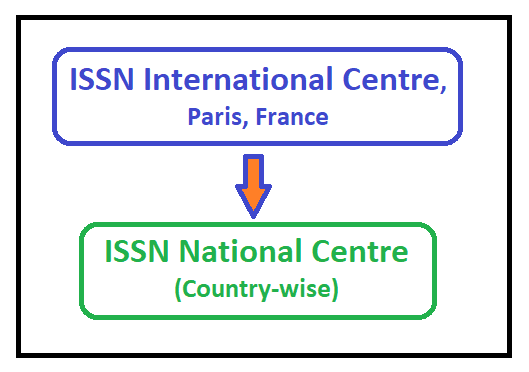
The overall charge of the related assignment and management activities is handled by “ISSN International Centre”, based in Paris, France. This central body is an intergovernmental organization. It was originated by UNESCO in 1974. It governs the various “ISSN National Centres” across the globe.  

This entity is responsible for maintaining the database of all assigned ISSNs worldwide. This database is known as ISDS Register (International Serials Data System). Many times it is also called as ISSN Register. This register is not open accessed; however, you can opt for the subscription for access.

ISSN National Centres (89 Centres):

This body works at the country level. Usually located at the country’s national or central library. They follow the guidelines of the international centre. This is the subordinate body of the ISSN international body. 

For example, an ISSN request from an Indian-origin serial will be handled by the ISSN National Centre, India (Located at India National Science Library CSIR-NIScPR, 14 Satsang Vihar Marg New Delhi – 110067 Email: [email protected] Ph.: 011- 26863759).

What is the format of ISSN?

  • First, ISSN is to be written as a prefix.
  • 8 digit code will follow the ISSN.
  • The first 4 digits and last 4 digits are divided by “-(hyphen)”.
  • Out of 8 digits, the first 7 are integer types (0-9). The last 8th digit can be from 0-9, or X. X is called the “check digit“, used for error detection and correction methods.
  • We can summarize the ISSN format as follows: 
  • ISSN NNNN-NNNC (Where N=0-9 & C=0-9 or X means check digit)
  • For Example, ISSN 2348-1269

Which are the types of ISSNs?

Types of ISSN

Broadly, types of ISSN are categorized as follows:

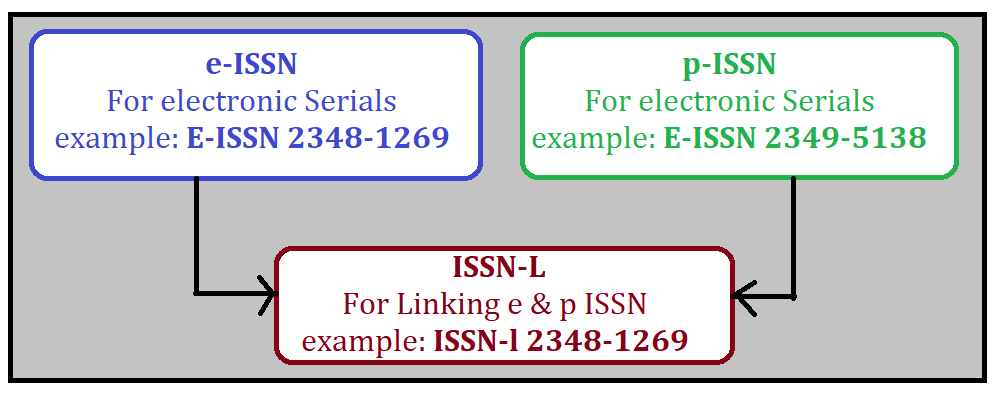
P-ISSN or p-ISSN (For Printed Version)

Used for the printed form of serial. Example: Printed magazine,

reports, journals, etc.

E-ISSN or e-ISSN (For Electronic Version)

Used for an electronic form of serial. Example: Online journals,

Online periodicals, etc.

ISSN-L or Linking ISSN (For Linking E & P ISSN)

This ISSN will link e & p ISSN. It will be the same as the ISSN of the first published form. Using this ISSN, you can easily track both forms of published medium.

Note: If the same content is published in dual format (i.e. Print and electronic), they will have different ISSNs for Print and electronic mediums. For example, the International Journal of Research and Analytical Reviews has a dual medium, so it contains two different ISSNs: (1) E-ISSN 2348-1269 (For Electronic) (2) P- ISSN 2349-5138 (For Print).

How to use ISSN for serials’ information retrival?

For this particular section, I would like to discuss 2 cases in which you can retrieve information about any serial with ISSN. 

Case-1: You have ISSN but not the name of the serial.

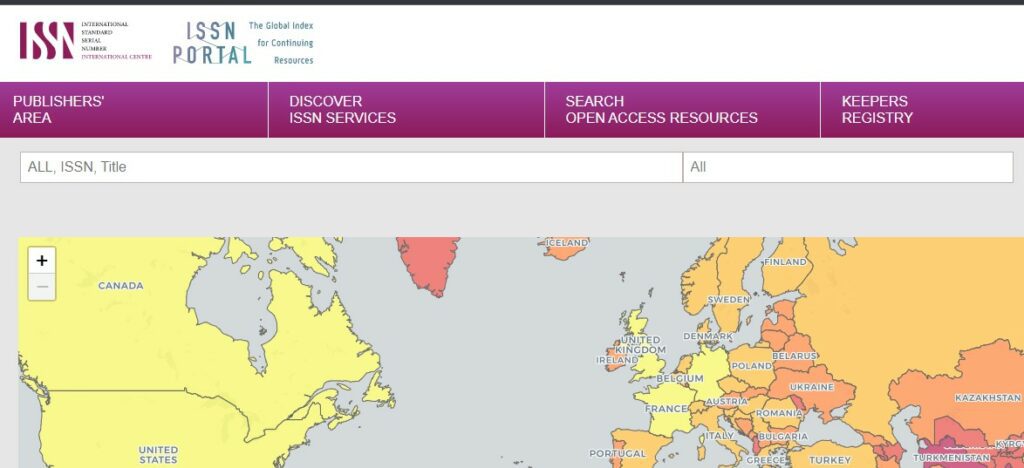
In this case, first, visit the website https://portal.issn.org/.

ISSN Portal

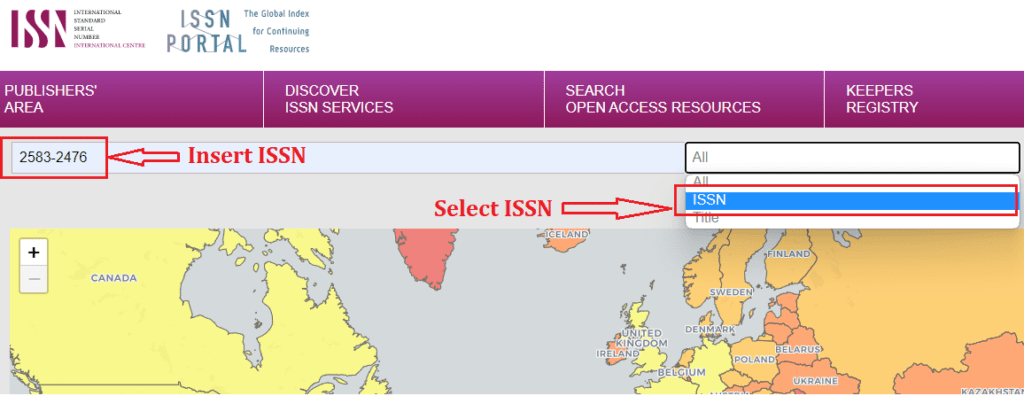
Insert ISSN only in the concern textbox and select “ISSN” from the dropdown box, as shown in the below screenshot. Then click on “Search.”

ISSN Portal 2

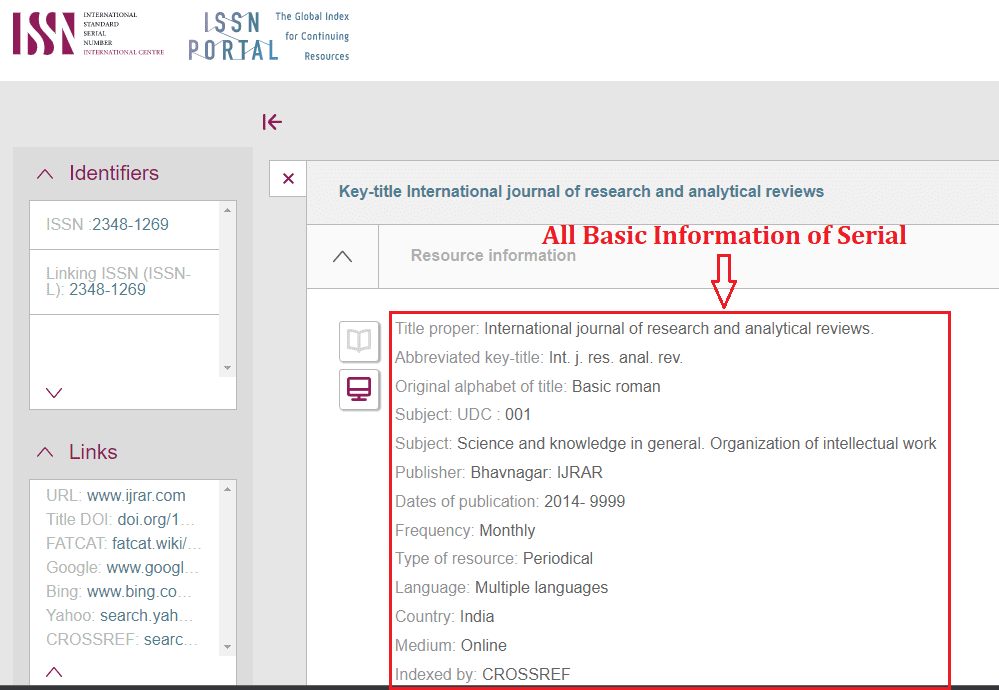
Now, you will have all the basic details about the journal or any other linked serials with inserted ISSN.

ISSN Portal 3

Case-2: You have the name of the serial but not the ISSN.

In this case, visit the website https://portal.issn.org/.

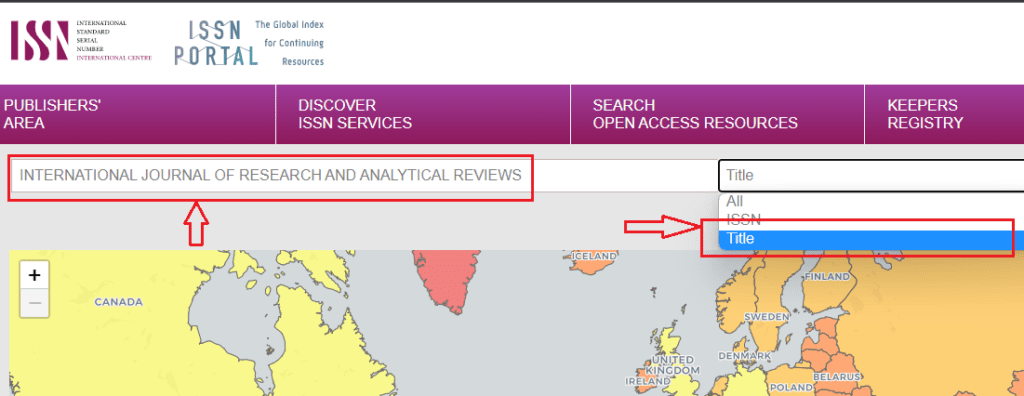
Insert the serial title in the concern textbox and select “title” from the dropdown box, as shown in the below screenshot. Then click on “Search.”

ISSN Portal 4

Now, you will have all the basic details about the journal if you have entered the correct title. From this process, you can retrieve the ISSN also.

Note: For retrieving the information regarding any serials, you need to have ISSN or its title. If you have the correct ISSN, then above said official portal of ISSN will eventually provide you with accurate information on the serials. By this method, you can check the authenticity of any serial.  

How to get ISSN?

To get ISSN in India, visit the official website of  ISSN National Centre, India, which is http://nsl.niscair.res.in/ISSNPROCESS/applyissn.jsp and follow the below steps:

Step-1

Click on the “Apply Online“.

ISSN Application Step-1

Step-2

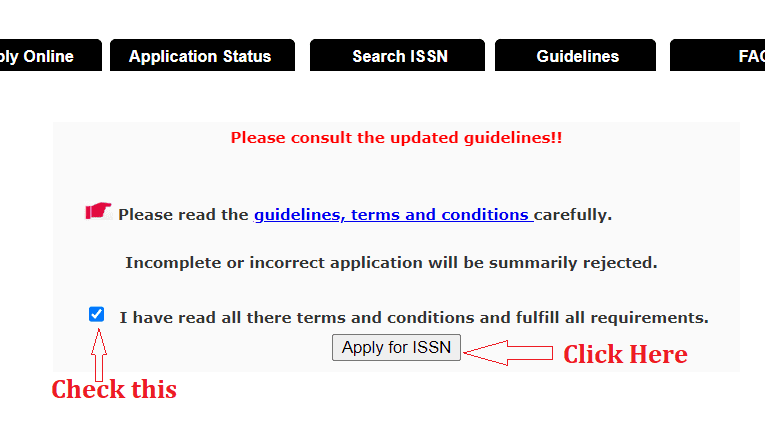
Check the checkbox shown below:

ISSN Application Step-2

Step-3

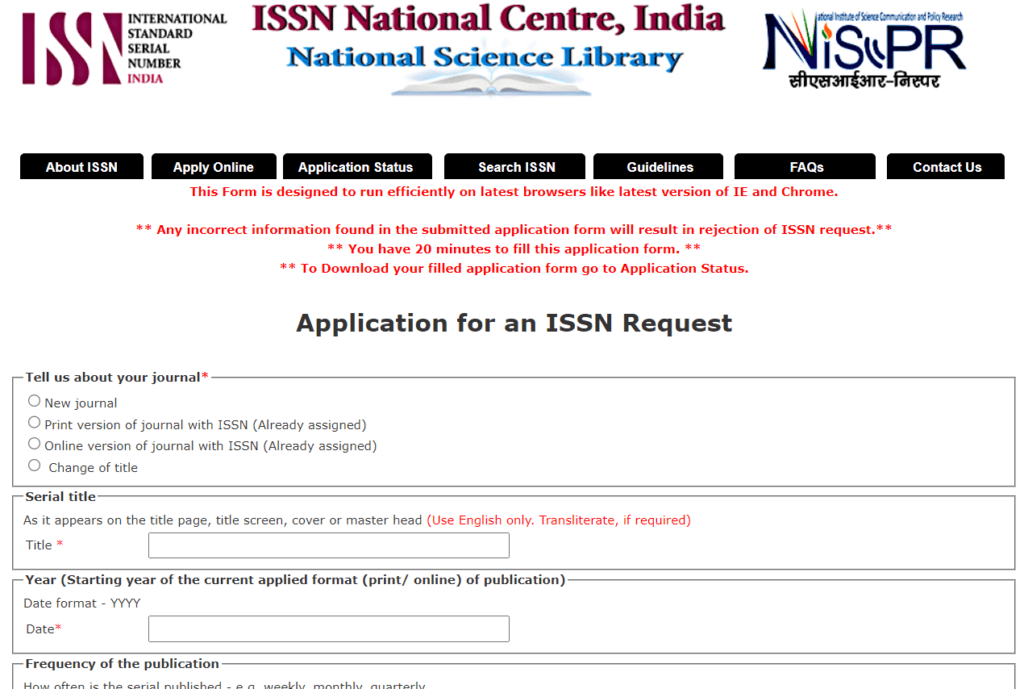
Now, the detailed application form will be opened. Please fill relevant information.

ISSN Application Step-3

Step-4

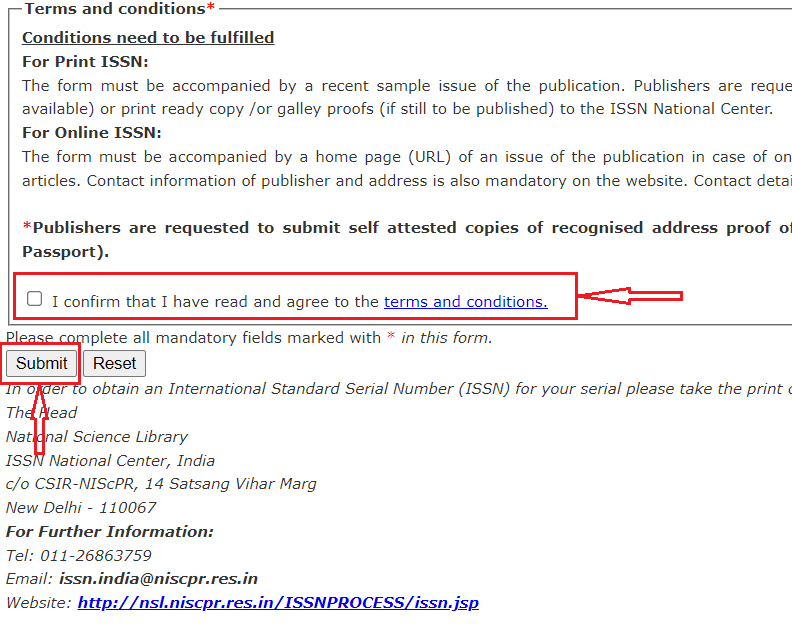
After filling in the relevant information, check the shown check box and click on submit button.

ISSN Application Step-4

Step-5

Take the printout of the generated pdf file and sign it. Attach one self-attested photo ID proof (of publisher or applicant) along with generated pdf printout. Send these two documents in one envelope to the following address via post.

National Science Library

ISSN National Center, India

c/o CSIR-NIScPR, 14 Satsang Vihar Marg

New Delhi – 110067

For Further Information:

Tel: 011-26863759

Conclusion

All in all, ISSN is a must-have for any serials, whether in print or electronic. ISSN will automatically grab the world’s attention for the authenticity of the published serial. In addition, ISSN makes it easy for the consumer to acquire information regarding printed or electronic content. It is helpful not only for consumers but also from the administrative point of view.

For acquiring ISSN, we at OJSCloud provide tailored services for your journal’s website. Our team has a success ratio of 100% in ISSN application acceptance. We design your website in such a way that your website will get ISSN on the first Attempt. Please click below to book an appointment.

Get ISSN
How to get ISSN?
Categories
Uncategorized

How to Get Free Digital Object Identifier (DOI)

Step-by-Step Guide: Free DOI

If you are reading this blog, I assume you feel pain for paying a reasonable amount for the DOI (Digital Object Identifier). So, I am giving a surety that you will eventually get relief after going through below mentioned steps.

Before moving on to the steps for getting free DOI, I would like to introduce the involved stack holders in this process, which are stated below with a corresponding brief introduction. If you know about the below-mentioned, you can directly jump onto the steps.

Involved Stakeholders:

What is Crossref?

Crossref is an official DOI Registration Agency of the International DOI Foundation. This is the conventional place for having the DOI facility. Anyone who wants DOI needs to be a member of the crossref with annual membership charges of $ 250 USD and $ 1 USD to $ 2 USD per DOI. for many publishers or individuals; these charges may be a reason for not having DOI. But the below three can provide DOI facilities for free. Let’s go through them.

ZENODO Free DOI

What is ZENODO?

It is an open repository managed under OpenAIRE, created by CERN. It allows researchers to store scholarly articles and other documents in digital format. ZENODO allocates a unique DOI to each digital document, which can easily be accessed on WWW for a perpetual duration. And the good part about all this is that you have to be a member and will not have to pay a single buck for DOI.

What is OpenAIRE?

It is a European project supporting the Open Science movement. It is a technical infrastructure that gathers research findings from connected data providers. It aims to institute an open and sustainable scholarly communication infrastructure. This infrastructure is capable of overall management, analysis, manipulation, delivery, monitoring, and uniting all research materials. CERN operates it.

What is CERN Data Center?

CERN is actually an acronym of Conseil Européen pour la Recherche Nucléaire. In English, it is known as  European Organization for Nuclear Research. At CERN, physicists and engineers are probing the universe’s fundamental structure. For this purpose, they have gigantic servers with huge computing power. They have a huge computing infrastructure as a whole. They do this by providing researchers with a unique range of particle accelerator facilities to advance the boundaries of human knowledge. CERN provides storage support to ZENODO for DOI.

Steps for Free DOI:

Step-1

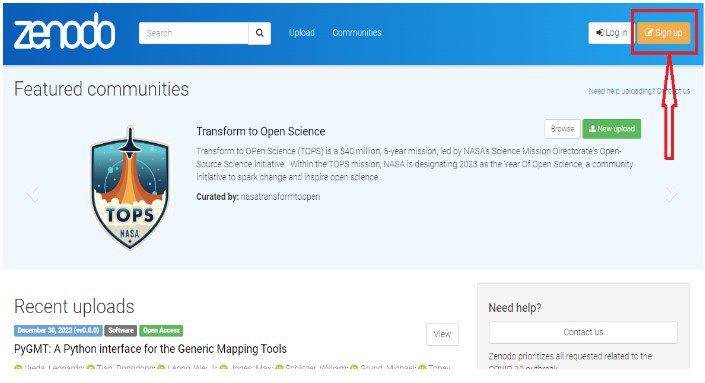
Type www.zenodo.org in the URL bar of the web browsers. You will have a webpage, as shown in the screenshot. If you have already created the account, click the “Log in” button; otherwise, click on the “Sign up” button.

Sign up
Free DOI Step-1

Step-2

Now, you will have a sign-up page, as shown in the screenshot below. You can signup using Github or ORCHID account. Else you can sign up using your normal email id. I will signup using my email id.

Sign up page
Free DOI Step-2

Step-3

An email verification link will be sent to your email id, which you entered during signup in step 2. Please find the email from zendo, and click on the link “confirm my account.” Now, you are registered in zendo.

Step-4

After email verification, you will be automatically login into the zendo. If this is not working, try to log in again.

Step-5

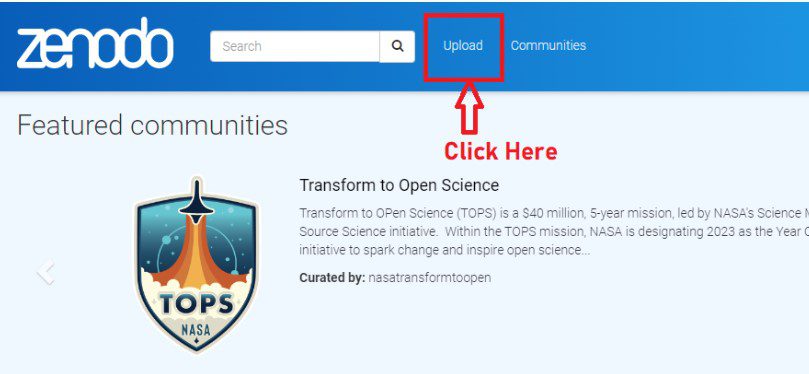
Click on the “Upload” tab on the topmost navigation bar.

Upload
Free DOI Step-5

Step-6

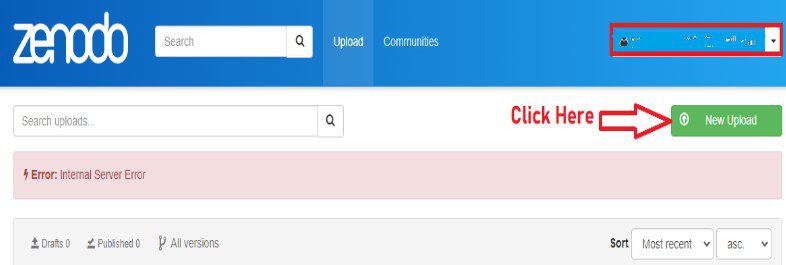
Click on the “New Upload” button.

New Upload
Free DOI Step-6

Step-7

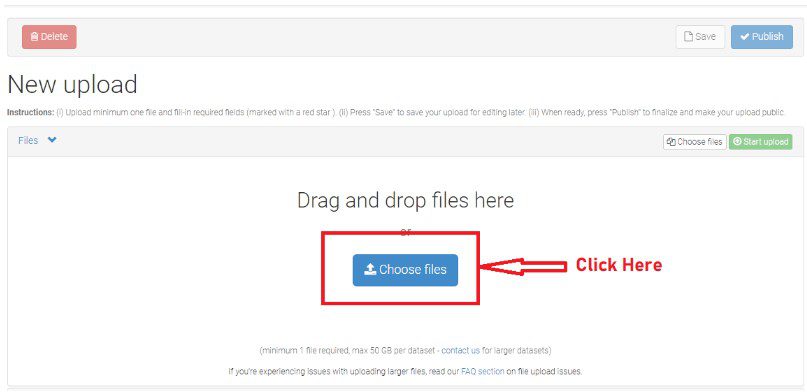
Click on the “Choose File.” The browsing window will be opened. Please choose you desired file for which you want to create DOI. 

Choose File
Free DOI Step-7

Step-8

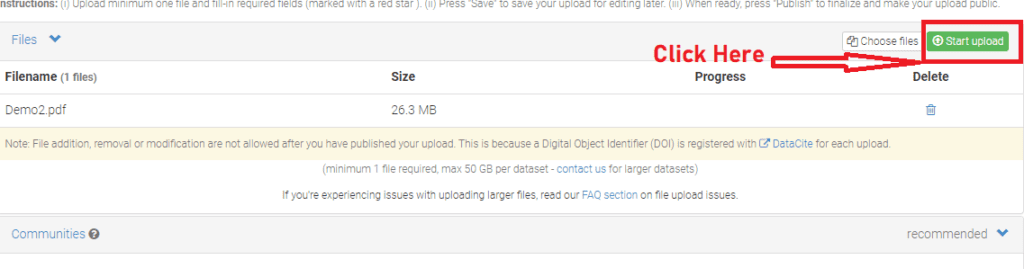
After selecting the file, click on “Start Upload.” Watch out for successful upload under the progress column. Then proceed with the required data insertion steps below (Step 9 onwards).

Start Upload
Free DOI Step-8

Step-9

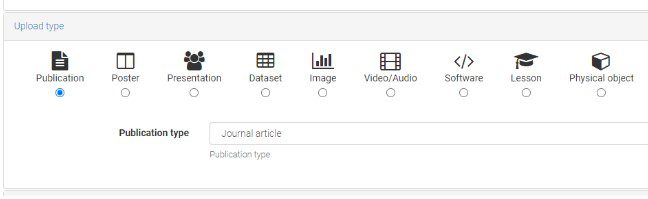
Select “upload type” of the uploaded document file in step 7. In our example, we have publication. For research articles, select the “Publication” radio button and “Journal Article” from the dropdown box.

upload type
Free DOI Step-9

Step-10

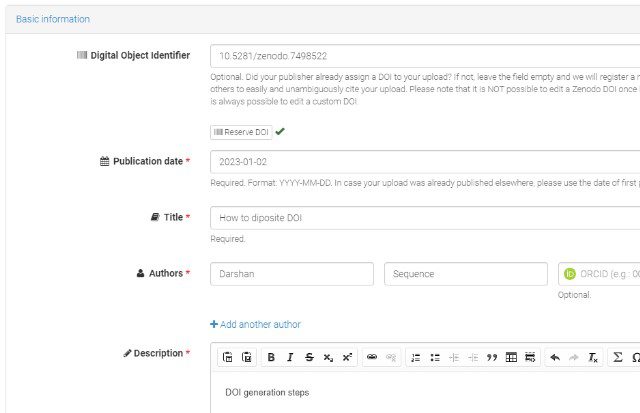
Fill in “Basic Information” relevant to the uploaded file. Like, as publication date, document title, author information, and description. I would suggest filling only mandatory fields for a faster process.

Basic Information
Free DOI Step-10

Step-11

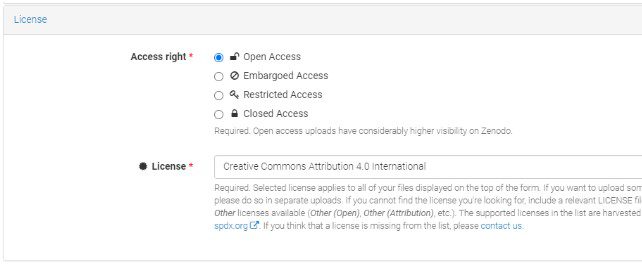
Fill “License” detail. This is for setting the access rights of the uploaded document. Do you want your article to be open-accessed or not?

License
Free DOI Step-11

Step-12

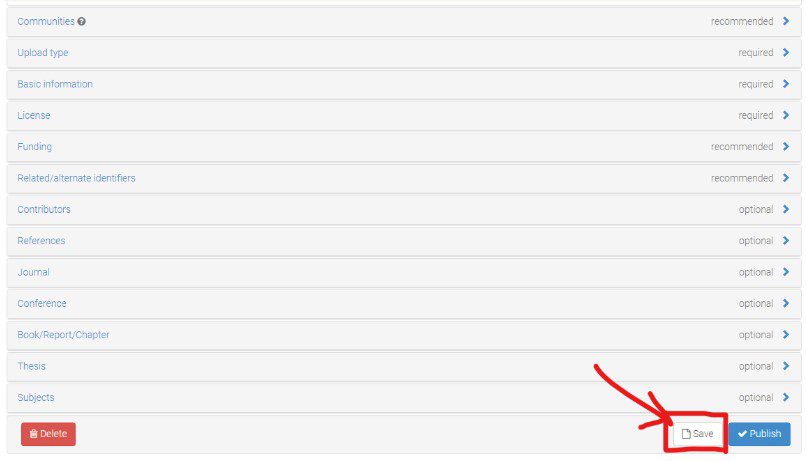
After inserting the concerned information, click on “save.” In this step, you can also delete the inserted detail by clicking on the left side “Delete(Red Colored background)” button. To move ahead, click on the “Publish” button.

How to Get Free Digital Object Identifier (DOI) 18
Free DOI Step-12

Step-13

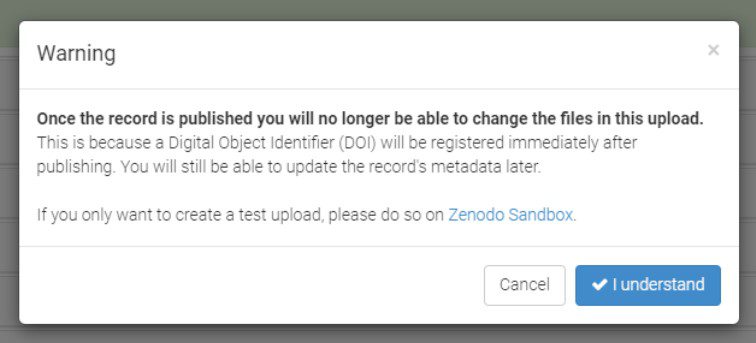
A warning message will appear after clicking on the “Publish” button in step 12, as shown below screenshot. Read that text very carefully. If you agree with that text, click “I understand.”

Publish
Free DOI Step-13

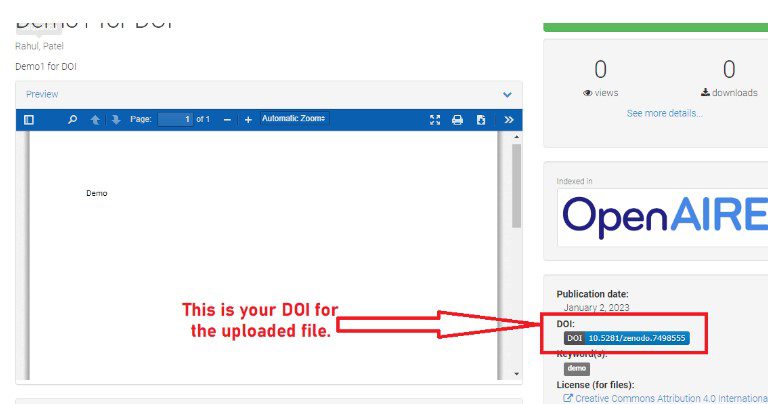
Step-14

Congratulation!!!! Now you are at the last stage. You can now see the DOI and the uploaded article preview in the right-hand corner.

Congratulation
Free DOI Step-14

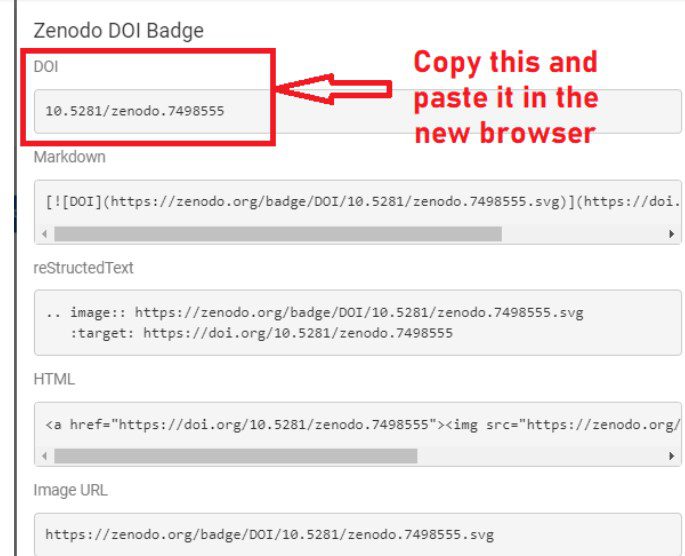
Step-15

Now click on DOI generated in the previous sep-14. A window containing “DOI Badge” will pop up. Your DOI information is here for your record. For the final check, please see below step-16

DOI Badge
Free DOI Step-15

Step-16

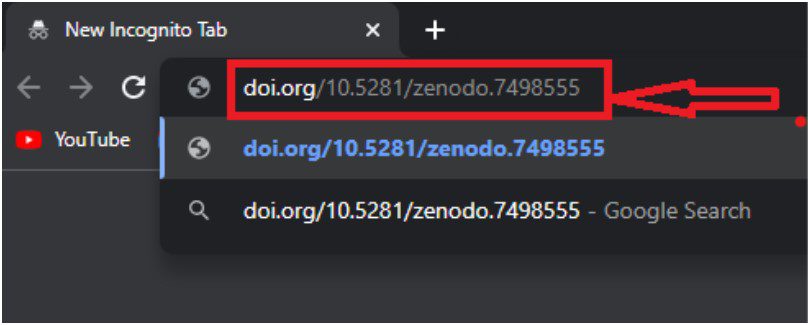
How to check generated DOI is working or not?

Now to check, copy the DOI generated in the previous step. Paste it in a new browser tab. Write “doi.org/” at the beginning of the pasted DOI “10.5281/zenodo.7498555”.

Your full DOI is “doi.org/10.5281/zenodo.7498555”

For a better understanding, see below:

How to Get Free Digital Object Identifier (DOI) 19
Free DOI Step-16

The above steps will generate the DOI with the zenodo keyword in each generated DOI. To avoid this problem, Click below

Get DOI >>
Get DOI

Conclusion

I would say DOI is essential to the research article’s life cycle. DOI is necessary to locate any document in WWW. However, DOI is not free, but with the help of CERN, ZENODO, and openAIRE, it is possible to have DOI for free. If you follow the above 16 steps, eventually, you will have free DOI for your digital object.

Categories
Uncategorized

How do Open Journal System Themes Affect SEO?

When we started to build our services, our primary goal was to revolutionize the online research paper publishing industry. To fulfill this, we choose an Open Journal System(OJS) as a platform.

The primary Reason for Choosing the Open Journal System(OJS) is due to its incredible popularity in the research fraternity, as far as open-access journals are concerned. However, we found that the default themes’ (provided by the Open Journal System(OJS)) layout and structure are not that sound in terms of user-friendliness and indexing. 

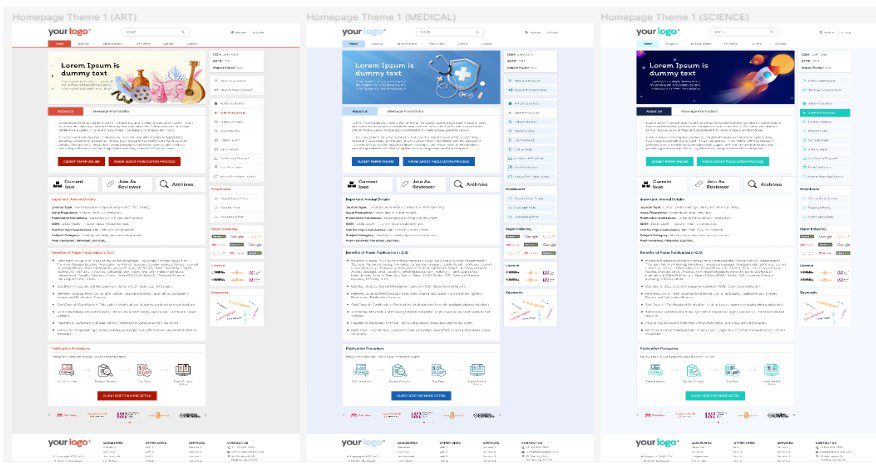
open journal system themes

To solve the problem discussed in the above section, we went back to the drawing board and had so many brainstorming sessions for building a new Open Journal System theme. As a result of those sessions, we finally landed to the conclusion that we need to have a customized open journal system theme and a search engine-friendly user interface that can improve the hosted journals’ page ranking and reachability. 

Consequently, we started to build our own customized themes for the publishers’ open-access journals hosted on the open journal system, which can help their journals to rank high on popular search engines. These open journal system themes are readily available and require lesser time to implement. In case the client wants more customization from scratch, we also provide customized open journal system theme development.

How does Journal’s website affect the page ranking? 

Google Ranking Factors

Popular search engines like Google and Microsoft Bing have published, the factors they look for, in the public domain for developers. These search engines keep on updating the list of elements they always consider while allowing any webpage or website visible on their platforms. 

The website’s looks and feels play a very important role in reducing the bounce rate. Ultimately good user experience helps to hold the website visitor for a longer period of time and eventually enhances the webpage’s reputation according to search engine optimization guidelines. As the open source platform, the open journal system provides little attention to the themes. So, when a journal is hosted on an open journal system and wants to rank high, it requires changing the website themes.

Role of presentation for open journal system themes:

To build new themes we have used our decade of experience and learnings acquired while developing products for world-renowned content management systems. We specifically kept in mind the “power of powerful presentation” which can hold the visitors of websites and convert them into prospective clients.

product-customization-for-customer-satisfaction

One common understanding will be much more impactful over here, to explain, why presentation is important for online journals: We would like to put it like this, which kind of store will you choose to buy your groceries from? One which is unorganized and filthy or another which has organized sections of classified and relevant stuff!!!!!!!!

Obviously, everyone chooses a store that has well organized, clean, easy to access, and an effortless way to find the stuff. Customers will come back again and again to buy something and from a service provider’s point of view, he/she can build a long-term relationship with the client.

How do Open Journal System Themes Affect SEO? 20

In continuation with the above-cited analogy, We can confidently say that, when it comes to online resources or websites, the same things are applicable. Well-laid-out, organized, and interactive online open-access journal websites can generate huge visitor traffic. Consequently, this can increase the subscription ratio and benefit our publishers.

How do Open Journal System Themes Affect SEO? 21

On the contrary, some would say that an Open Journal System(OJS) is not a normal website for purchasing something. I would show positive agreement on this, however, I would definitely like to cite our personal findings about the factors affecting the impact factor of the journal, one of them is the “presentation quality”.

What are the factors that affect the page ranking of a website?

page ranking of a website

Mobile phone friendly

Other than website layout and user interface, in the modern era, your website must be responsive in nature. In other words, the website must be mobile phone friendly. Nowadays people are spending much time on the internet via mobile phones rather than laptops or desktops. Google also emphasizes ranking websites high, that have responsive architecture. To make the website responsive for each type of mobile screen, the developer has to go through rigorous brainstorming while the development phase.

Mobile phone friendly

Page Speed

The speed of the webpage is also considered a major factor for higher ranking by the leading search engines. The reason for this is very obvious no one wants to wait for a long time. Everyone wants quick loading of webpages, if your website failed to load very quickly, the user bounce rate will going to increase for sure, so the developer must take care of the optimized coding pattern. 

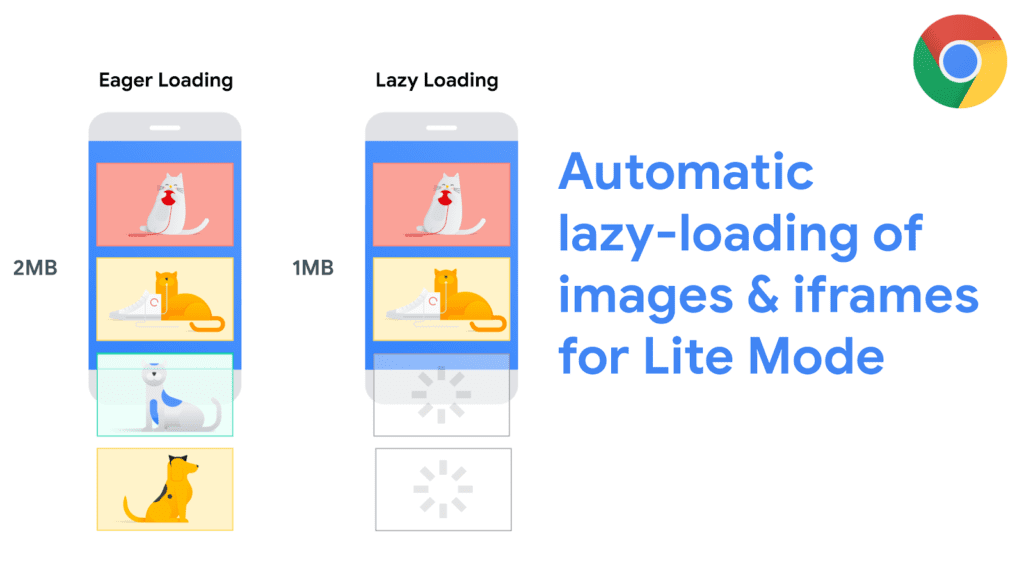
The more images are on a webpage, the longer it takes to load, so images must be compressed and minimal. Developers should choose the technic like lazy loading (Images load as the user scroll down rather than loading at once).

Apart from the above-cited parameters, our developing team constantly keeps eye on guidelines and key factors to optimize the hosted websites via the OJSCloud platform. During this routine exercise, our team found that Google put a lot of emphasis on factors, which are in our control. 

How does Journal Indexing increase the page ranking in search engines? 

How do Open Journal System Themes Affect SEO? 22

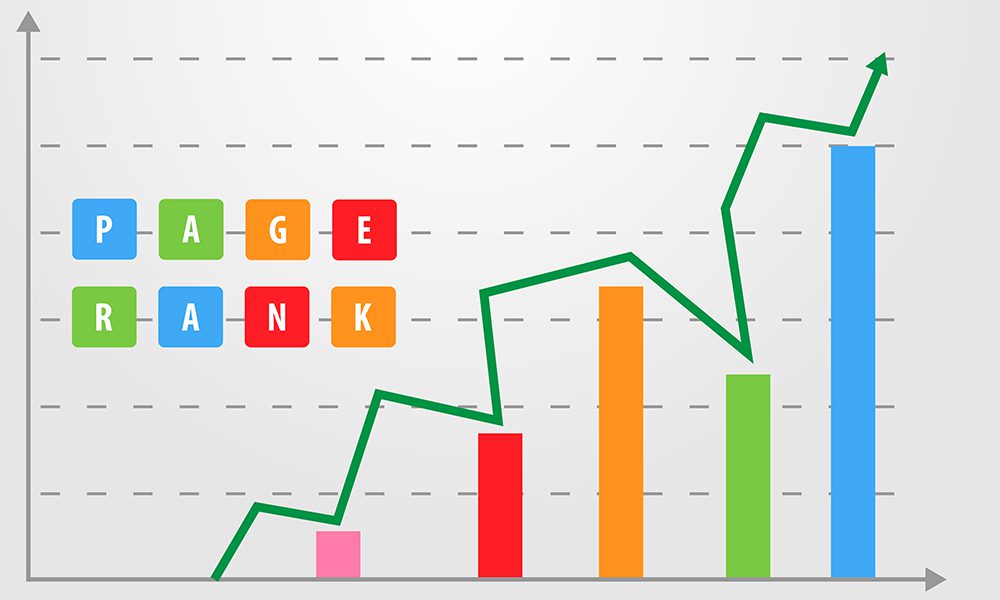
indexing is a much-needed and unavoidable attribute of any online resources because this backend hard work makes them very easy to access on the world wide web. The indexing of a journal is considered a reflection of its quality. Indexed journals are considered to be of higher scientific quality as compared to non-indexed journals. In addition, it works as a search engine for showing concerned journal articles with higher page ranks. To simply summarize, we can say that to make your journal popular enough you need to have indexing from reputed and well-recognized agencies.

Quality Manual

You can choose many indexing service providers such as Scopus, Web of Science, PubMed, Google Scholar, BASE, Academia, and Copernicus. It is advisable to have multiple indexing to grab the attention of the wider research community. Indexing is not only the mechanism to generate more traffic but also the parameter of quality work followed by journal articles. 

Many quality-oriented crowds always search for better indexing from well-recognized agencies, and as soon as they do not find it, they might leave the website. As a result, this thing hampers our goal of incrementing the visitors-to-client conversion ratio. Any journal which needs better indexing is required to focus on the term “citation”, because when anyone cites an article from one journal to another article, it automatically creates the impression of some good work. When some potential user types some keyword that is related to the articles on some search engine, the journal that has many backlinks will be ranked on the first page of their site.

page Rank

The process of indexing will help the articles to get cited and increase their discoverability. We should not forget over here about the timeline, as you may not find the results immediately, but over a period of time, you will end up getting good results for the indexing. Search engines do not contain the understanding power as humans, instead, they rely on citation and indexing which ultimately apply rigorous assessment criteria to judge any new journal article.

The indexing of the journal is the most important point to be taken into account for many well-established and qualified authors because research funding agencies always look for higher impact and easy discoverability of published work. Ultimately, these two parameters for funding agencies totally depend upon the indexing. I think there are enough words to explain the importance of indexing in the world of research publication.
We have readily available SEO frindly themes. Please click below to see our OJS themes.

Get OJS Themes
Open Journal System

Conclusion

All in all online resources created for any motive can achieve it when they will be visible to someone who is the intended audience. This information-hungry crowd always starts to feed their knowledge hunger from search engines like Google or Microsoft Bling. So as a developer, it is unavoidable fact that they should design a particular website in such a way that they will be ranked higher and must be visible among the top 3 positions of the search result. 

Categories
Uncategorized

What is Journal Indexing and Why is it Important?

It would be better to start with the basic analogy to explain the importance of journal indexing.

“There are so many car manufacturers that exist in this world and they all say that their products are better in material quality and safety. So, Customers have no clue about the reality. In this situation, independent agencies like NCAP, SAE, ARAI, etc. come into the picture to analyze each manufacturer’s products against their claim and release a report for the general population, which indeed helps the potential buyer to decide whether he/she should choose this car or not?”

The same thing is also applicable to online journals. As you know there are so many online journals out there and they all claim that they are best in their corresponding fields.

Now when it comes to selecting a journal to publish his/her research articles, the researcher may go into a dilemma. Researchers might get confused about choosing an appropriate publisher’s online journal for their invaluable research work. At this stage, the journal indexing comes to play the role of an independent referee to see if the claim made by the journal’s publisher is right or wrong.

So, What is journal indexing? (Let’s hit the bull’s eye)

What is journal indexing

Journal indexing is the conceptual measurement instrument, which measures the degree of goodness of an online journal. Basically, it sets certain standards and quality parameters for a journal to pass. The journal which surpasses the decided thresholds for qualifying can be called an “indexed journal(s)”. A journal index is also termed a ‘bibliographic database’ or ‘bibliographic index’

It is a well-organized list of journals, which is made based on a few considerations such as discipline, subject, region, and many more. Eventually, it can be used by the general public or research scholars to find concerning information on certain areas.

Index journals don’t only help to search the content but also attract many research scholars around the globe to publish their work in indexed online journals, as it makes the researcher’s research work impactful and visible.   

What criteria are important for any journal to get indexed?

eligibility-criteria

Online journals or online open-access journals are gone under a rigorous homologation process to make sure that they fulfill certain criteria. All indexing agencies have their own set of judging parameters, but few are very basic for all. They are given below

How to index your open-access journal? What are the types of indexing agencies?

tips-for-job-application-forms

There are basically 2 types of indexing agencies:

(1) Public Indexing like Google Scholar

What is Journal Indexing and Why is it Important? 23

It is a popular scholarly indexing engine that crawls the web looking for scholarly publications: articles, books, reports, theses, conference proceedings, and preprints, among others. Google scholar identifies scholarly content, determines each item’s bibliographic metadata, and groups different online versions of an item together with this metadata in search results.

There is no need to register your journal with Google Scholar. Google Scholar will eventually find and automatically crawl the site. If you notice that your journal is not appearing in Google Scholar, there may be some issues that need to be addressed. You can find more details about it on Google scholar’s official website.

(2) Private Indexing Like Scopus, PubMed, EBSCO, etc.

Private Indexing

For your journal to enter a reputed journal indexing agency, you need to apply for the relevant firm. Upon receiving the request for indexing, the indexation team (often referred to as auditors) will pass your journal through the earlier discussed parameters. Auditors will crosscheck information such as;

  • A full listing of the editorial board on the website
  • The inclusion of ethics statements in published articles
  • Established appeal and retraction processes

Indexed journal vs non-indexed journal? What is the importance of journal indexing?

Indexed journal vs non-indexed journal

As a researcher, you always want your research work to shout for itself as much as possible. At the same time, you also want it to be credible for other researchers along with normal knowledge seekers, online as well as offline. So, as discussed at the beginning of this blog, it is good for any journal that someone else (indexing agencies) speaks for its quality. Such a mechanism makes them credible. Eventually, researchers’ published articles in an indexed journal get much better attention than in a non-indexed journal. Ultimately, for any researcher, the main objective is, to have more citations.

Organizations and research institutes are always insisting their staff/students publish corresponding research work in reputed journals which are indexed. Hence, the index of the journal becomes an important milestone for graduation/promotion/grant funding.

Why Journal Indexing is important for Open Access Journal?

Advantages of Open Access Journal

In the world of research, publication trends are now shifting towards open-access journals, which means these journals are not required to be subscribed to on a monthly/yearly basis. Instead, anyone can access them online. Observing the widely accepted trend in the research publication field such open-access journals keep on erupting on day to day basis.

Reasons for the popularity of open-access journals:

  • High visibility. Anyone can access and read your paper.
  • Publication speed. It is generally quicker to post an article online than to publish it in a traditional journal format.

Open access platform is good for the easy access point of view but at the same time, they also open the gates for so many unethical practitioners and bad guys, whose primary intention to establish the journal is to “earn money”. The such journal publishes the researchers’ articles without any kind of peer review process. Moreover, they do not check for plagiarism and committee copyright violations. 

For new researchers, journal indexing plays a vital role because it is very tough to identify which is good and which one is bad. They just put their hard-earned money into publishing, and in the end, they get a very poor result. Journal indexing is necessary in pulling out the best quality open-access journals from a pile of available journals in the ocean of the world wide web.

How to identify whether the open-access journal is indexed or not?

open-access journal

If an online open-access journal is indexed by any reputed agencies, they must include logos of such agencies on their websites. However, in many cases, it has been observed that low-quality journals are putting the logos of indexing agencies on their websites without any kind of authorization to show the affiliation. Journal indexing is always termed as a thing to showcase not to hide so journal indexing is very easy to find if it is available. 

In this situation, it would be always advisable to check the journal indexing status on the corresponding “Indexing Agencies official website” by inserting the journal’s name or ISSN number. You can find journal indexing using this way also.

What is the difference between journal indexing and impact factors of journals? Index of vs Impact Factor

Index of vs Impact Factor

By the shallow observation, you might reach the conclusion that both the things are same as they both recite something about the quality of the journal. However, technically both terms are not the same. It is very obvious that indexed journals in reputed international databases will have always a better and higher value of impact factor than the non-indexed. 

It is very important to know that many reputed journals do not have an impact factor even though they are indexed. By this deep observation, we can say that the impact factor is not the compulsory parameter to judge the quality of any journal. We can say that the impact factor is not the only sufficient parameter to judge the quality of a journal. It makes sense when it is coupled with indexing.

To get your journal indexed, please click below.

Get Your Journal Indexed >>
Journal Indexing

Conclusion

To conclude I would say, that journal indexing plays a very important role in assessing the quality of the journal. In the era of online open-access journals, where researchers have so many options to publish. In such a situation, indexing can avoid confusion about where to publish his/her research article.

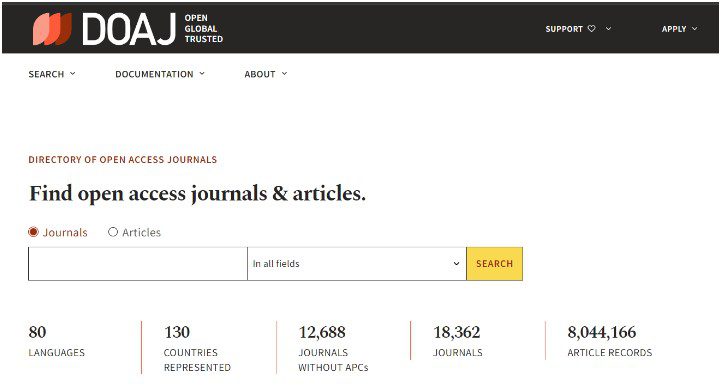
for the publishers/promoters of the journal, it is always good to be indexed with reputed and worldwide accepted journal indexing agencies like DOAJ, SCOPUS, WOS, etc. on the other hand, for researchers it is always advisable to publish in indexed journals rather than non-indexed because former will make the research work more valuable and visible.

Categories
Uncategorized

What is Free OMP (Open Monograph Press)?

How does OMP (Open Monograph Press) differ from OJS (Open Journal System)?

To initialize I would say, OMP (Open Monograph Press) and OJS (Open Monograph System) are kind of free or you can say open-source software. This software is developed and managed by PKP ( Public Knowledge Project). OMP is released under the open-source GPL v2 license.

PKP is an initiative of multiple universities to provide open-source software to the world research community, to bring scholarly publishing under one umbrella as far as the World Wide Web is concerned. 

PKP All Softwaresz

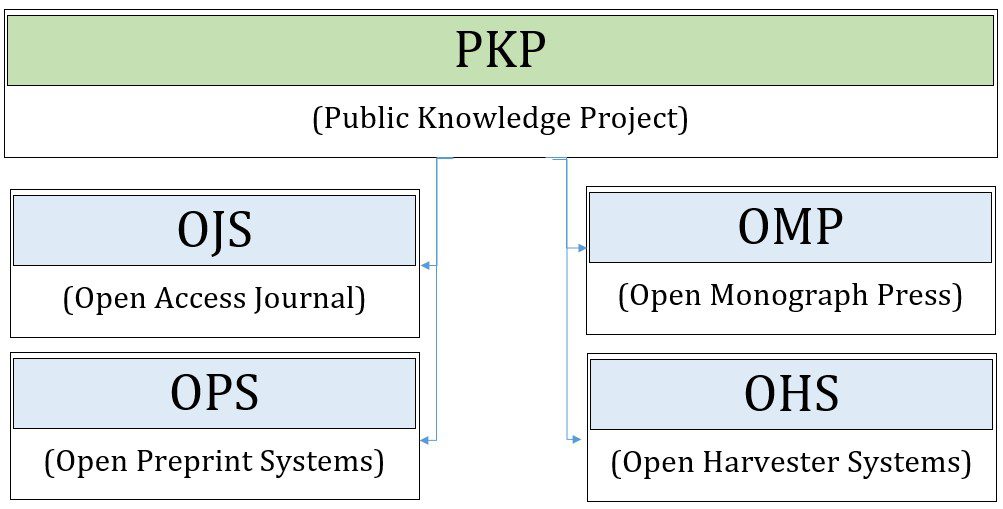
PKP not only has OMP and OJS, but it also provides software like OPS( Open Preprint Systems) and OHS (Open Harvester Systems). In this section, we will only talk about OMP.

What is OMP (Open Monograph Press)?

Open Monograph Press

It is a very robust open-source platform, which primary task is to avail the functionality by which book publishing tasks can become hassle-free. This software has a very good capability to manage and publish scholarly books. 

We have a dedicated expert team for OMP (Open Monograph Press) services. To make online book publishing tasks easy, click below to schedule a meeting.

Get OMP Service >>
OMP

To make the explanation very clear I am penning down the all functionalities heading below which are offered by OMP. In the later part, you will find detailed functionalities.

  • Overall book publishing management, which involves
    • Editorial Workflow, which involves:
      • Monographs
      • Edited Volumes
      • Scholarly Editions
      • Internal & Eternal
        • Review,
        • Editing,
        • Cataloging,
        • Production,
        • Publishing

OMP can also work as a stand-alone website with multiple functionalities like catalogs, distribution support, and sales support.

Which are the functionalities provided by OMP (Open Monograph Press)?

  • Different authors for each chapter handle edited volumes.
  • It involves stakeholders with no complexity like;
    • Editors
    • Authors
    • Reviewers
    • Designers
    • Indexers
  • The complex process of the internal and external review process is handled with ease. Even multiple rounds of review are easily handled.
  • In spite of being open-source software, it also incorporates services from the industry standards like ONIX, which is an expert in handling metadata requirements for major online plates like amazon. 
  • Log document libraries are also provided to manage submissions, recording contracts, and other permissions.
  • Proper thumbnail covers are shown in the catalog and Spotlight features so website visitors can be attracted to the particular book.
  • Fee-based service that provides the installation and hosting of OMP.
  • Daily backups of your data, 
  • Applying security patches 
  • Periodical upgrades, 
  • priority answering your support questions. 

How does OMP (Open Monograph Press) differ from OJS (Open Journal System)?

OMP vs OJS

As far as the birth of these two software systems is concerned, they share the common goal of “Management of Scholarly Research Work & Publishing them online”. The area in which they operate to manage the resources makes them different from each other.

Both software originated from a common platform run by the Public Knowledge Project (PKP), which is known for its non-profit nature and availing subscription-less, customizable various research-oriented software management systems. User can decorate their websites made by such platforms very easily and of course free of cost. This software holds the GNU General Public License (GPL v3) 

The primary goal of PKP is to initiate the OMP to make book publishing very easy for non-technical background people. It has a very simple and self-explanatory workflow.

OMP Workflow

The main focus of OJS is to grab the attention of the research community, spread across the world. It provides services to individuals as well as the institute to host an open-access journal with a simplified editorial workflow. As more than 10000 open-access journals already have been hosted using OJS, it is very popular amongst the research community.

What is Free OMP (Open Monograph Press)? 24
https://sauraj.in/index.php/SAURAJ

Conclusion

OMP is basically an open-source software, that is free for anyone to use with customization for publishing scholarly books online. It is developed by the Public Knowledge Project (PKP). Where the software is free to download or modify. Both software is licensed under the GNU General Public License (GPL v3). It is the one-stop solution for managing complex book publishing tasks.

Categories
Uncategorized

What are Free Open Preprint Systems (OPS)?

To begin with the basic idea, I would say, Open Preprint Systems (OPS) and Open Journal Systems (OJS) are kind of free or you can say open-source software. This software is developed and managed by PKP ( Public Knowledge Project). PKP is a project of various universities spread across the world to provide open-source software to the world research community, and to bring scholarly publishing under one umbrella as far as the World Wide Web is concerned. This software primarily aims at digitization of research work to make it more accessible easily and without any subscription. 

Open Preprint Systems

PKP not only has Open Preprint Systems and Open Journal System, but it also provides software like Open Monograph Press (OMP) and OHS (Open Harvester Systems). In this section, we will only talk about Open Preprint Systems. 

What is Open Preprint Systems (OPS)?

What are Free Open Preprint Systems (OPS)? 25
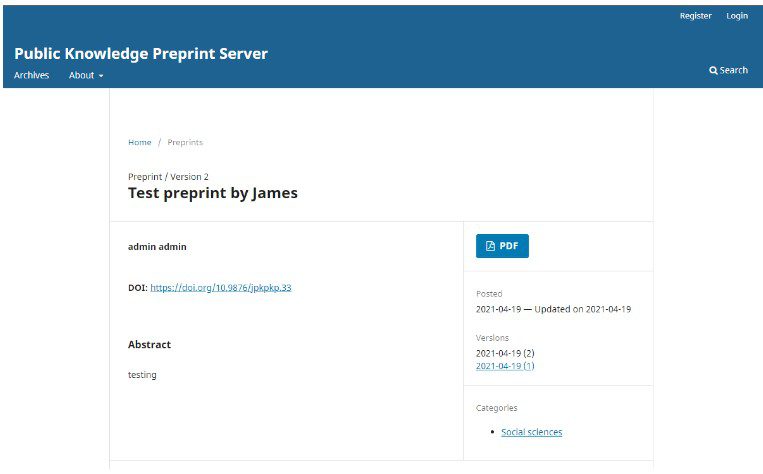
https://demo.publicknowledgeproject.org/ops/demo/index.php/publicknowledge/preprint/view/33

It is a very robust open-source platform, which primary task is to avail the functionality by which preprint management of research papers can become hassle-free. This software has a very good capability to manage research papers that are not published.

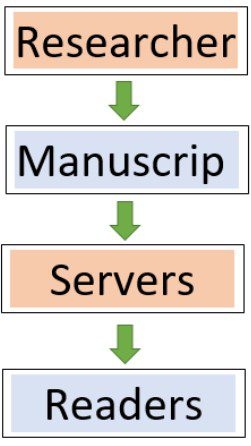
For providing the above-discussed functionalities Open Preprint Systems uses the same software architecture just as Open Journal System (OJS). Open Preprint Systems manages the servers which hold the preprint of research papers, that are accessible online by the general population.

What is a preprint?

What is a preprint?

It is nothing but one kind of research paper in its draft form not in the final published version. Many times it happens that researchers want their novel ideas put in front of the world before it gets finalized. A research paper is a thing that cannot be finished in one go, it requires a lot of editing and a rigorous back & forth correction process. 

  • During its implementation part, a single research paper generates many versions, which are called preprints. 
  • A research paper that is accepted by editors but not published is also called a preprint.  
  • A research paper that is sent back to the writer for correction by the editors, is also called a preprint. 

Which are the functionalities provided by Open Preprint Systems (OPS)?

Functionalities and Capacities
  • Responsive reader front-end with multiple options for content organization
  • Author-led rapid publication workflow
  • Online submission and management of all content
  • Customizable to suit your screening policies, with several options included
  • Integrated with scholarly publishing services such as Crossref and ORCiD
  • Locally installed and controlled
  • Community-led and supported
  • Built-in support for a wide array of features from the OJS and OMP ecosystem
  • Available in English, Spanish, and Portuguese, with more languages to come

How do Open Preprint Systems (OPS) differ from Open Journal Systems (OJS)?

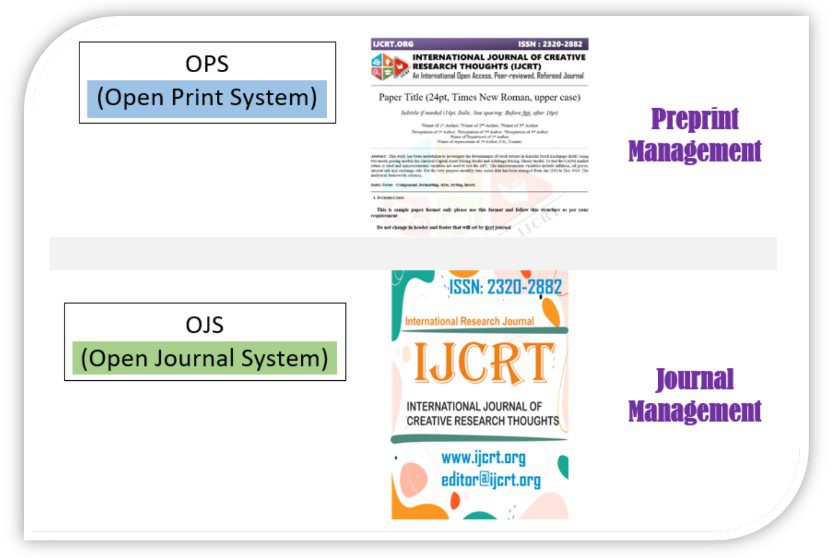
OPS vs OJS

As far as the birth of these two software systems is concerned, they share the common goal of “Management of Scholarly Research Work & Publishing them online”. The way in which they operate to manage the resources makes them different from each other.

pkp
https://pkp.sfu.ca/

Both software originated from a common platform run by the Public Knowledge Project (PKP), which is known for its non-profit nature and availing subscription-less, customizable various research-oriented software management systems. User can decorate their websites made by such platforms very easily and of course free of cost. This software holds the GNU General Public License (GPL v3) 

The primary goal of PKP is to initiate the OPS to make preprint management very easy for people who do not have a technical background. It has a very simple and self-explanatory workflow.

On the other hand, The main focus of OJS is to grab the attention of the research community, spread across the world. It provides services to individuals as well as the institute to host an open-access journal with a simplified editorial workflow. As more than 10000 open-access journals already have been hosted using OJS, it is very popular amongst the research community. 

What are Free Open Preprint Systems (OPS)? 26
https://sauraj.in/index.php/SAURAJ

We have a dedicated expert team for OPS (Open Preprint System) services. To make preprint management tasks easy, click below to schedule a meeting.

Get OPS Service >>
OPS

Conclusion

OPS is basically an open-source software, that is free for anyone to use with preprint handling. It is developed by the Public Knowledge Project (PKP). Where the software is free to download or modify. Both software is licensed under the GNU General Public License (GPL v3). It is the one-stop solution for managing complex preprints.

Categories
Uncategorized

What is DOI and Why is it Important in Scholarly Publishing?

As you know, digitization is penetrating the whole world due to the internet’s widespread and unavoidable nature. It doesn’t matter in which industry you are in you need to know What is DOI? whether you want it or not, you will have to accept the influence and importance of computers and specifically the internet in your work/business/enterprise/organization/product.

Concerning the aforementioned initialization, it would not be early to point out the area of interest here: “what is DOI?”, and “research paper publication” to open access journals, which is far from digitizing. As a result, I would simply answer the question “what is doi?”: It is some arrangement/mechanism that makes the task simpler and easy to access the research document from the deep sea of the “World Wide Web (WWW)”.

what is doi?

You can also put it like this, to answer what is DOI? DOI will bring the research fraternity even closer around the globe. If you ask me, “is it compulsory for each and every digital document to have DOI?” My answer would be no. The reason for saying this is that, as of now, DOI is not mandatory, but it is much better. Attaching DOI with the research documents will boost your citation count and contribute more to the betterment of humanity. It is a win-win situation.

To summarize, it would be good to write here: “DOI resolves the problem of finding research documents online at the fingertips”.

So what is DOI?

what is DOI

It is a non-repetitive, and constant group of characters, numbers, symbols, special characters and words, linked with online journals, articles, books and many more intellectual digital works for a perpetual time period.

It works as a permanent web address just as a URL for research papers/articles/books, like any other website URL. By clicking on it, an authorized person can access the e-resources online very quickly, without thinking about other complexity.

So, I think we have had enough discussion over the answer to the question “what is DOI?” multiple times and you made your mind clear about the same question what is DOI? So Now we should know more about the DOI in subsequent sections.

What does DOI look like?

It is just like some type of hyperlinks, for example:

  • doi:10.1080/8585748585.2022.1770549
  • https://doi.org/10.0011/hex.12445
  • https://dx.doi.org/10.1080/02022667.2019.15662625
  • https://doi.org/11.1026/j.jpsychires.2018.11.015

Which types of digital documents can have DOI?

DOI can be attached to;

Journal Details
  1. academic journal articles 
  2. research reports 
  3. governmental reports
  4. data sets
  5. books
  6. conference proceedings
  7. code
  8. media 

Why is DOI needed for research articles?

it is a unique dangling identifier for online research articles/books/papers, or documents. It is used for permanently citing the documents in the ocean of www. 

Why is DOI needed for research articles?

You may say research articles can be accessed via the publisher-provided link, but what happens if the publisher’s website may lose its domain or may find some technical problems in hosting?

In the above-discussed situation, the document cannot be accessed via the link provided by the publisher. In such a scenario, DOI is the only solution for accessing the document on the World Wide Web. DOIs make it easier to retrieve your digital document.

We can say that DOI is more stable than normal web links.

How to find DOI in an online research paper?

How to find DOI in an online research paper

Generally, you can have a DOI link underneath the research paper title, but this position is not fixed for each and every journal. Sometimes you can also find the DOI in the footer as well. It is totally dependent upon the journal management authorities where they want to place it. The only concern is that it must be easily visible to any visitor.  

What if you do not find DOI in a research article?

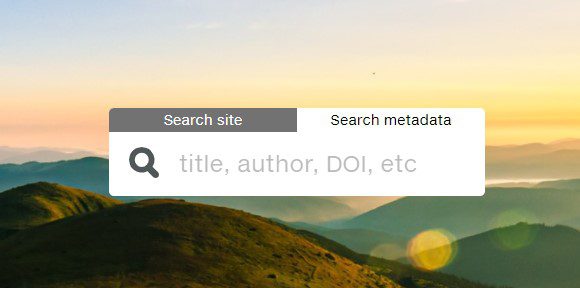
Insert relevant information like article title/author into the metadata field on.

find DOI in a research

How to get a DOI?

International DOI Foundation is responsible for managing the body of the DOI. Several DOI agencies have affiliation and homologation with the International DOI Foundation, the end touch point for the DOI creation. To get the DOI, you must find the service providers, such as OJSCloud, India’s leading DOI provider. They are the official sponsored partner of crossref (one of the registration agencies for the International DOI Foundation). It assigns DOIs to scholarly research publications.

OJSCloud is official sponsored partner of Crossref to provide DOI. Contact us today to get DOI.

Get DOI
Get DOI

Conclusion:

To summarize, it would not be wrong to say that DOI is a very important and unavoidable mechanism for online research papers/articles, which helps to find them easily from WWW for an infinite period of time. In the modern era of digitization, not attaching DOI with an online research paper is just like shouting about your research work in the assembly of the deaf.